Lab 06 A Map Built on a Binary Search Tree
In your introductory course you used a Python dictionary. A dictionary stores key–value pairs: you look up a key, such as a word, and get back the value stored with it, such as how many times that word appeared. The general name for this structure is an associative array, because it associates each key with a value. In Java it is called a map, and this week you will build one.
In lecture, each node of the binary search tree stored a single key. Today each node will also store a value, so the tree holds ⟨key, value⟩ pairs. The tree is still ordered by key, so lecture's insert, search, and traversals work just as before: they find the right node by its key, then use the value stored beside it.
| Python dictionary | Our Java map (BSTMap) |
|---|---|
counts = {} | BSTMap<String, Integer> counts = new BSTMap<String, Integer>(); |
counts["the"] = 5 | counts.put("the", 5); |
counts.get("the") | counts.get("the") (null if "the" is not a key) |
"the" in counts | counts.containsKey("the") |
len(counts) | counts.size() |
sorted(counts.keys()) | counts.keySet() (already in sorted order: it's a search tree) |
In this lab and in Project 06, the keys are always words (String) and the values are always whole numbers (Integer): a BSTMap<String, Integer>. In the project, each word's value is how many times it appears in a text.
- Build (Tasks 1, 2, 4): Write put and get using lecture's insert and search (Lecture 23, BST II).
- See it (Task 3): Watch your tree grow in a window, and see what sorted input does to it.
- Finish the map (Tasks 5, 6): List the keys in sorted order (Lecture 24, BST III) and measure how deep the tree is (Lecture 22, BST I).
- Apply in Project 06: Add remove (lecture's delete), then use your map to count every word in large texts.
Setup
Create Projects/Project06 in your personal Google Drive folder and download the three files below. BSTMap.java is the class you will complete. It already has the Node class, the fields, and a placeholder for every method.
Download now:
Keep the field names in BSTMap.java (root, and key, value, left, right in Node). The tester and the display look inside your tree through those names.
A tree can return the right answers while having the wrong shape, and the shape decides how fast it is. So don't just run your code and trust what prints. Decide first what should happen, then check it.
- Draw it. Before each put, draw the tree and decide where the new key goes, as in lecture's warm-ups.
- Predict the result of each test before you run it. The "expected X, got Y" lines only help if you decided X yourself.
- Implement one method at a time.
- Run your own small tests in
main, and look at the tree in the window (Task 3). - Run the tester after each task. The lab checkpoint comes after Task 4. A method you haven't written yet shows as SKIP, not as a crash, so you can see your progress.
Task 1 — Meet BSTMap READ
Open BSTMap.java next to your lecture notes. It is lecture's BST class with three changes: each node holds a value as well as a key, the map counts its keys in size, and keys are compared with compareTo instead of < and ==.
| In lecture | Slides | In BSTMap | Task |
|---|---|---|---|
public class Node: int key; Node left, right; | L23 6–12 | private class Node: K key; V value; Node left; Node right; (provided). In this lab K is String and V is Integer | 1 |
Node root; | L23 13 | Node root; and int size; (provided) | 1 |
key < root.key | L23 34–39 | key.compareTo(cur.key) < 0 | 2 |
key > root.key | L23 34–39 | key.compareTo(cur.key) > 0 | 2 |
root.key == key | L23 90 | key.compareTo(cur.key) == 0 | 2 |
insert(key), the driver | L23 20 | put(key, value) (provided) | 2 |
insert_Recursive(root, key) | L23 20–47 | insert(cur, key, value) | 2 |
search_Recursive(root, key) | L23 88–92 | find(cur, key) | 2 |
search(key), returns true or false | L23 85–87 | containsKey(key); and get(key), which returns the value | 4 |
| (not in lecture) | size(), clear() | 4 | |
| in-order traversal | L24 4 | keySet(), values() | 5 |
| height of the root (counts edges) | L22 4, 44–45 | maxDepth() (counts levels: height + 1) | 6 |
minValue, deleteKey, delete_Recursive | L24 54–111 | remove(key) | Project 06 |
One name changes everywhere: lecture's recursive methods call their node parameter root. Ours call it cur (the current node), because the class already has a field named root, and two different things with the same name is a classic source of bugs. Wherever lecture code says root inside a recursive method, read cur.
| Lecture's key | 3 | 8 | 10 | 15 | 16 | 17 | 20 |
|---|---|---|---|---|---|---|---|
| Our key | ant | bee | cat | dog | eel | fox | gnu |
Putting dog, bee, fox, ant, cat, eel, gnu, in that order, builds exactly the tree on lecture's slides, with dog where 15 was. The tester and the demo use these words, so you can check your tree against the slide pictures.
public class BSTMap<K extends Comparable<K>, V> implements MapSet<K, V>
K is the type of the keys and V the type of the values, just as T is the item type in your LinkedList<T>. A word-count map is a BSTMap<String, Integer>.
K extends Comparable<K> says the keys must know how to compare themselves. String and Integer do, through a method called compareTo. a.compareTo(b) returns a negative number if a comes before b, 0 if they are equal, and a positive number if a comes after b. For example, "cat".compareTo("dog") is negative, and Strings compare in dictionary order. That is all a search tree needs to know about its keys.
implements MapSet<K, V> promises the methods listed in MapSet.java, the same way your LinkedList implements Stack and Queue.
root.key == key, which is right for ints. For objects such as Strings, == asks whether two variables refer to the same object, not whether they hold the same word. The word "the" read twice from a file gives two different String objects, so == says they differ. Small Integers happen to work by luck, which makes this bug easy to miss. Always use compareTo.Every method you write starts with a throw line, such as throw new UnsupportedOperationException("get is not written yet (Task 4)");. It is a placeholder: it lets the file compile and tells the tester the method isn't written yet. Delete that line when you write the method.
Compile and run the tester now. Every section after Task 1 should say SKIP.
javac *.java
java Lab06Tester
Task 2 — put: search, then insert REUSE
A map differs from lecture's tree in one way. When a key is already there, put replaces its value instead of ignoring it, and returns the old value. Read the provided put: it first searches for the key with find. If find returns a node, put replaces that node's value. If not, put inserts a new node with insert, exactly as lecture's insert does, and adds one to size.
root = insert(root, key, value); // the same line as lecture's insert driver
Write the two recursive methods put uses. Each is a lecture method with a few words changed.
2a. find: lecture's search_Recursive (L23, slides 88–92)
// Lecture 23, slide 92
private Node search_Recursive(Node root, int key) {
    // Base Cases: root is null or key is present at root
    if (root==null || root.key==key)
        return root;
    // val is greater than root's key
    if (root.key > key)
        return search_Recursive(root.left, key);
    // val is less than root's key
    return search_Recursive(root.right, key);
}
| Lecture | BSTMap's find |
|---|---|
search_Recursive(Node root, int key) | find(Node cur, K key): write cur wherever lecture writes root |
root.key==key | key.compareTo(cur.key) == 0 |
root.key > key (the node's key is bigger) | key.compareTo(cur.key) < 0 (our key is smaller). Careful: lecture puts the node's key first, and we put our key first, so the sign flips. |
search_Recursive(root.left, key) | find(cur.left, key), and the same on the right |
Lecture's first line works for us too: Java checks cur == null first and stops there if it's true, so compareTo is never called on a missing node.
2b. insert: lecture's insert_Recursive (L23, slides 20–47)
// Lecture 23, slide 47
private Node insert_Recursive(Node root, int key) {
    //tree is empty
    if (root == null) {
        return new Node(key);
    }
    //traverse the tree
    if (key < root.key) //insert in the left subtree
        root.left = insert_Recursive(root.left, key);
    else if (key > root.key) //insert in the right subtree
        root.right = insert_Recursive(root.right, key);
    // return pointer
    return root;
}
| Lecture | BSTMap's insert |
|---|---|
insert_Recursive(Node root, int key) | insert(Node cur, K key, V value): write cur wherever lecture writes root |
new Node(key) | new Node(key, value) |
key < root.key and key > root.key | key.compareTo(cur.key) < 0 and key.compareTo(cur.key) > 0 (same order, so no sign flip here) |
insert_Recursive(root.left, key) | insert(cur.left, key, value), and the same on the right |
| no case for an equal key (a duplicate is ignored) | the same: put already handled an equal key before calling insert |
Lecture's driver, root = insert_Recursive(root, key); on slide 20, is the line root = insert(root, key, value); in the provided put. To see insert run step by step, lecture traces inserting 15 on slides 41–56 and 17 on slides 57–81.
Ask Yourself — why reassign the link?
- insert writes
cur.left = insert(cur.left, key, value);, not justinsert(cur.left, key, value);. Trace putting "ant" into a tree that holds only "dog". What does the call return, and where would the new node go without the assignment? - For a node that already has a left child, the call returns that same child. Why is it safe to assign it back?
- Why does put search before it inserts? What would happen to size if it inserted first?
Copy, paste, and complete: Paste this test into a new public static void main(String[] args) at the end of BSTMap.java, and complete the TODOs. System.out.print(map) uses the provided toString, which prints the keys level by level.
// Task 2: Paste INSIDE a main method at the end of BSTMap.java.
BSTMap<String, Integer> map = new BSTMap<String, Integer>();
map.put("dog", 15);
map.put("bee", 8);
map.put("fox", 17);
System.out.print(map);   // expected:  level 0: dog   then  level 1: bee fox
System.out.println("put(\"ant\", 3) adds a NEW word, so there is no old value to return.");
System.out.println("    expected null, got " + map.put("ant", 3));
System.out.println("put(\"bee\", 80) replaces bee's value, so it returns the OLD value, 8.");
System.out.println("    expected 8, got " + map.put("bee", 80));
// TODO: Put "cat" (10) and "eel" (16), then print the map. Draw the tree first:
//       on which level is each word, and is it a left or a right child?
// TODO: Put "dog" again with a new value. Print what put returns, and print
//       the map to check that no new node was added.
Run javac *.java and java BSTMap, then java Lab06Tester. The Task 2 section should pass.
Task 3 — Watch the tree grow READ AND EXPERIMENT
Download now:
BSTDisplay draws your tree in a window, one row per level, with the level numbers on the left and the number of nodes in each level on the right. After each put, it outlines the path from the root to the new key. You don't need to read BSTDisplay.java. BSTDemo uses your put to build two trees, one step each time you press Enter.
javac *.java
java BSTDemo
- Lecture's tree, in words: dog, bee, fox, ant, cat, eel, gnu. This is the tree of 15, 8, 17, 3, 10, 16, 20 from L22, slides 21–39. Before each Enter, say where the word will go. The outlined path is the comparisons put made on the way down.
- The same seven words in alphabetical order: ant, bee, cat, dog, eel, fox, gnu. Predict the shape before you press Enter. Compare it with lecture's "Is this a binary search tree?" example (L22, slides 41–45): the same chain, going the other way, where search becomes O(n).
Ask Yourself — shape decides speed
- How many nodes does a search visit to find "gnu" in the first tree? In the second? Both trees hold the same 7 words.
- Lecture asked you to draw the 5 possible shapes for the keys 1, 2, 3 (L22, slides 65–66). Which insertion order gives each shape? Which orders give the balanced one?
- A book is not written in alphabetical order. Would you expect the words of a book to build a tree more like the first one or the second?
Task 4 — get, containsKey, size, and clear REUSE
These four are short, because find does the work.
containsKey(K key): lecture'ssearchdriver (L23, slides 85–87) with a new name. Callfind(root, key)and return true if it found a node.get(K key): the same driver, but it returns the found node's value instead of true, and null instead of false.size(): return the field. put already keeps it up to date.clear(): set root to null and size to 0. As lecture said about deleting a node, Java reclaims nodes that nothing refers to any more.
Add expected-versus-got lines to your main: get a key that is present, a key that is missing, and a key on an empty map. Then run the tester; the Task 4 section should pass.
java BSTDemo: lecture's tree with dog at the top, and the alphabetical chain. Then keep going with Tasks 5 and 6.Task 5 — keySet and values, in sorted order DESIGN
Lecture 24 (slide 4) traced four orders through its tree of 15, 8, 17, 3, 16, 20. In-order (left subtree, node, right subtree) visits the keys from smallest to largest:
| Traversal | Lecture's tree |
|---|---|
| Preorder (node, left, right) | 15, 8, 3, 17, 16, 20 |
| In-order (left, node, right) | 3, 8, 15, 16, 17, 20 |
| Postorder (left, right, node) | 3, 8, 16, 20, 17, 15 |
| Breadth first (level by level) | 15, 8, 17, 3, 16, 20 |
keySet() returns an ArrayList of every key, in sorted order. Use a driver and a recursive method, the same pattern as lecture's insert and search drivers:
public ArrayList<K> keySet() {
    ArrayList<K> keys = new ArrayList<K>();
    keySet(root, keys);      // the recursive method fills the list
    return keys;
}

private void keySet(Node cur, ArrayList<K> keys) {
    // TODO: if cur is null, return.
    //       Visit the left subtree, add cur.key, visit the right subtree.
}
For our word version of lecture's tree, keySet gives [ant, bee, cat, dog, eel, fox, gnu]. Write values() the same way, adding cur.value; for that tree it gives [3, 8, 10, 15, 16, 17, 20], lecture's numbers back in order. Because both visit the nodes in the same order, values().get(i) is the value for keySet().get(i).
Download now: two small word files. tiny.txt is the 60-word opening of A Tale of Two Cities. sorted.txt holds the same 20 different words, once each, in alphabetical order.
java BSTDemo tiny.txt
BSTDemo counts the words with your put and get, then lists each word and its count using your keySet and values. Before you run it, predict: which words appear more than once, and which word comes first in the list?
Task 6 — maxDepth: how many levels? CONNECT
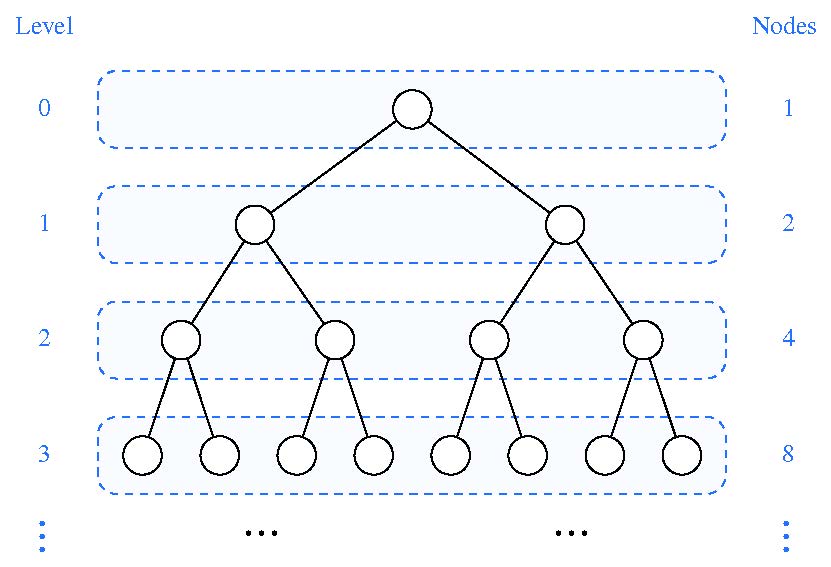
maxDepth() returns the number of levels in the tree: the most nodes get may have to look at to find one key. The part of the tree in the picture has four levels, 0 to 3, so its maxDepth is 4. Lecture measured trees by their height, which counts edges instead of nodes (L22, slide 4: "What's the height of the root? 4" for a tree with 5 levels), so the height of the tree in the picture is 3. Lecture also showed that search time is the height of the tree (L22, slides 44–45), which is why we measure it. The two always differ by one:
| Tree | Lecture's height (edges) | maxDepth (levels) |
|---|---|---|
| empty | none | 0 |
| one node | 0 | 1 |
| lecture's 7-node tree (dog at the root) | 2 | 3 |
| the seven words in alphabetical order | 6 | 7 |
Write it with a driver and a recursive method. An empty subtree has 0 levels. A node's subtree has 1 level for the node itself, plus the levels of its deeper child. Math.max(a, b) returns the larger of two ints.
Then compare the two word files. They hold the same 20 different words:
java BSTDemo tiny.txt
java BSTDemo sorted.txt
Ask Yourself — the worst case
- How many levels does each tree have? Count the nodes in each level of the window. How do they compare with the 1, 2, 4, 8 of a full tree?
- How many nodes would get look at, at most, to find a word in each tree? Which tree behaves like a linked list?
- A full tree with 20 levels could hold about a million keys. How many keys does the sorted tree hold in its 20 levels?
Run the basic checks
javac *.java
java Lab06Tester
Lab06Tester runs every check, keeps going after a failure, and ends with a summary. Each line says what the tester did and what should happen, for example put("cat", 99): cat is already in the map, so put returns cat's OLD value, 10. When a check fails, it shows what the answer should be and what yours gave. Its sections follow the tasks:
| Section | What it checks |
|---|---|
| Task 1: the provided BSTMap | the tester can find root and look inside your tree |
| Task 2: put | dog, bee, fox, ant, cat, eel, gnu give lecture's tree, level by level; put's return values; replacing a value adds no node; the same word in a different String object; alphabetical order makes a chain; 300 random keys stay in search-tree order |
| Task 4: get, containsKey, size, clear | present and missing keys, an empty map, size after replacing, and using the map again after clear |
| Task 5: keySet and values | alphabetical order, values lined up with their keys, word counts |
| Task 6: maxDepth | 0, 1, 3, and 7 levels, and a random tree |
cur.key before checking whether cur is null. If a section runs for more than 10 seconds, the tester reports a likely infinite loop and stops.Lab checkpoint
The checkpoint comes after Task 4: show a TA or instructor your Lab06Tester summary with the Task 2 and Task 4 sections passing, and the two trees from java BSTDemo. Tasks 5 and 6 are short and use the same recursion. Finish them after the checkpoint, in lab or on your own, before you start Project 06; the project uses keySet and values, and its checklist asks for every Lab06Tester section to pass.
This is a required graded lab. After your checkpoint you may work on the project until the individual closed-book quiz; remain for the quiz. Make sure your code is in Projects/Project06 before the lab ends.