 Project 2
Project 2: A Shape Collection
The goal of this assignment is to give you practice in creating and using functions and function parameters in Python. You'll continue to create shapes using turtle graphics, just like we did in lab.
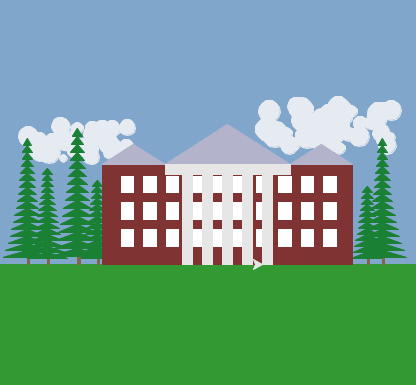
The end result of the assignment should be a representation of a scene depicting something that reminds you of home. You have wide latitude in your choice of subject, and the scene can be as simple or complex as you like. What is important is to properly structure your code and include good comments.
Remember that you need to write the code yourself. You can discuss the assignment and ideas regarding the assignment with others in natural language, but not Python. If you have questions about your Python code (other than very simple syntax questions), please ask one of the lab assistants or professors. Please see the syllabus for guidelines on collaboration and attribution.
Tasks
-
Make a copy of your lab2.py file and rename it shapelib.py (for
"Shape Library"). Delete the any code not in a function
from the file so that only the import statements and the functions
remain. You should not have any top level code (code not
inside a function) in the shapelib.py file. It is meant to form a
library of shape-drawing functions that other code files will be
able to import and use.
Your first task is to create a main.py file that imports your shapelib.py functions. To do this, create a file called main.py in a text editor, and at the top (after your name, date, and description) put the following.
import shapelib
This lets you call any functions in your shapelib.py file, such as block, using the syntax shapelib.block.
In your main.py file, make a function called home1. Put a single call to the home1 function at the end of the file, followed by a raw_input call.
Write some python code in your home1 function that calls some of the functions from your shapelib.py file to draw a simple image (like a few blocks). Note that to call a function from your shapelib file you have to prepend shapelib. in front of the function name. For example shapelib.block( 10, 10, 20, 30 ) would be how you would call the block function.
You can run your main.py file using:
python main.py
You don't need to save this image, as you'll be replacing the code in the home1 function later on.
-
In your shapelib.py file, make 2 more functions for drawing basic
shapes like the block function from lab. Basic shapes should
take in at least an x location, y location, and size information. For
example, you could make a triangle function or a hexagon function with
the size value being the length of a side, in pixels . Put a print
statement at the beginning of each function and test them out by
calling the functions in your main.py function.
Each of your shapes should draw properly no matter where it is drawn on the screen, what the size parameter is, or what the orientation of the turtle happens to be when the shape function executes. Test this out for all of your functions.
In your writeup, include a picture demonstrating that your shape functions work properly. This is required picture 1.
When you have a picture or scene you want to save, make a screen capture of it on a mac using the key combination Command-Shift-4. The picture will automatically be saved to a file on your Desktop. You can then move and rename it to a more appropriate location. Make sure the entire scene is visible in the image.
-
In the shapelib.py file, make 2 functions that draw objects/things
that remind you of home (a tree, a house, a chair, a room, a table, a
clock, an object, food, knick-knacks, etc.). You can pick small
objects, or big things. The objects should be built from several of
the simpler shapes (triangles, blocks) from your library.
When you define these aggregate shape functions, they should all take at least three parameters. The first two (x0, y0) will define the starting location for the shape and the third should define the scale of the shape. A scale factor of 1.0 should draw the shape in its natural size. Feel free to add additional parameters as you like to control other aspects of the shape. As with the basic shapes, your shapes should draw properly at any scale, location, or turtle orientation.
For a little more detail on making aggregate shapes, see the geometric thinking page.
In both of of your new functions, use one or more of the basic shape functions to draw the shape. For example, a house shape might incorporate the block and triangle functions. Test out your new functions before proceeding.
In your writeup, include a picture demonstrating that each of your aggregate shape functions work properly. That means drawing it in several locations at several scales. This is required picture 2.
-
Now it is time to write the real code for your home1 function. Using
the functions you created in steps 2 and 3, make a scene with
something that reminds of home. In your scene, make use of the fact
that your functions can draw the shapes with different sizes in
different locations. You can also use the random package and for loops
to make more complex scenes, such as lots of trees or plants or
wall-paper patterns.
Save the image and include it in your writeup. This is required picture 3.
-
Make a second, different scene in a function home2 in your main.py file.
Save the image and include it in your writeup. This is required picture 4.
Extensions
Each assignment will have a set of suggested extensions. The required tasks constitute about 85% of the assignment, and if you do only the required tasks and do them well you will earn a B+. To earn a higher grade, you need to undertake one or more extensions, which give you the opportunity to tailor the assignment to your own interests.
How well you complete the main assignment, combined with the difficulty and quality of any extension or extensions you complete will determine your final grade for the assignment. One complex extension, done well, or 2-3 simple extensions are typical.
- Make additional basic or complex shape functions that make use of your other shape functions.
- Make additional scenes that show creative use of functions, loops, or randomness.
- Make use of the for loop control structure from the lab (you can also read Python documentation to teach yourself additional features).
-
Make use of the random package to make your scene more
interesting. For example, if you import the random package into your
program:
import random
Then you can use it to generate random integers using the following expression, where a and b are the upper and lower bounds of the random numbers you want.random.randint(a, b)
- Make use of other turtle properties such as line width, color, and fill capability to make your shapes more interesting.
- Add additional parameters to your shapes to control properties like line width and color.
Writeup and Hand-in
Turn in your code by putting it into your Private handin directory on the Courses server. All files should be organized in a folder titled project2. Include only those files necessary to run the program. We will grade all files and only the files in the project2 directory, so please do not turn in old, non-working, versions of your code.
Make a new wiki page for your assignment. Put the label cs151f16project2 in the label field on the bottom of the page. Give the page a meaningful title (e.g. Stephanie's project 2).
In general, your intended audience for your write-up is your peers not in the class. Your goal should be to be able to use it to explain to friends what you accomplished in this project and to give them a sense of how you did it. Follow the outline below.
- A brief summary of the task, in your own words. This should be no more than a few sentences. Give the reader (a peer not in the course) context and identify the key purpose of the assignment.
- A description of your solution to the tasks, including any images you created. This should be a description of the form and functionality of your final code. You may want to incorporate code snippets in your description to point out relevant features. Note any unique computational solutions you developed. Code snippets should be small segments of code--usually one or two lines and normally much less than a whole function--that demonstrate a particular concept. If you find yourself including more than 5-10 lines of code, it's probably not a snippet.
- A description of any extensions you undertook, including images demonstrating those extensions. If you added any modules, functions, or other design components, note their structure and the algorithms you used.
- A brief description (1-3 sentences) of what you learned. Think about the answer to this question in terms of the stated purpose of the project. What are some specific things you had to learn or discover in order to complete the project?
- A list of people you worked with, including TAs, and professors. Include in that list anyone whose code you may have seen, such as those of friends who have taken the course in a previous semester.
- Don't forget to label your writeup so that it is easy for others to find. For this lab, use cs151f16project2