 Project 9
Project 9: Unique Trees and Shapes
The project this week is to continue to make shape classes, making use of inheritance, starting with a tree class.
Tasks
-
The first task is to make a Tree shape class, similar to the Square
and Triangle classes. The difference between a Tree and a Square,
though, is that the Tree generates its string dynamically using an
L-system. The string for a Square is always the same, so it can set
the string field once and then use the parent Shape class' draw
method. However, every time we draw a tree, we first must build a
string using an L-system. Then it can use the Shape draw method.
Because we use an L-system to generate the string to draw, a Tree object must contain an L-system, which means it must have a field that holds an L-system object.
Because a Tree is a Shape, it must be a child of the Shape class. That lets it use the parent methods for setting color, distance, and angle, among other things.
To make our Tree class, start by creating a file called tree.py. Import your lsystem and shape modules. The Tree class should be derived from the Shape class, but you'll need to override some of the methods because of the special nature of a Tree: it needs more fields than a simple Shape, and it has to dynamically create the string it will draw using an L-system.
The methods you'll need to override or create for the Tree class include:
- def __init__(self, distance=5, angle=22.5, color=(0.5, 0.4, 0.3), iterations=3, filename=None): - The init method should call the parent init with distance, angle, and color, store the iterations number in an iterations field, then create an Lsystem object (passing in the filename) and store it in an lsystem field.
- Create a setIterations mutator for the iterations field of the Tree object. Then create a read(self, filename) method that calls the lsystem's read method with the specified filename.
- Override the draw method--but keep the same parameter list--so it uses the Lsystem to build the string, assigns the string to the string field of self, and then calls the parent draw method. You may want to change the default orientation to 90 so the trees grow up.
Once you've written the tree class, make a test method for the class and try it out. The test method should take in an Lsystem filename, create a Tree object, and then use the Tree object's draw method to draw at least 3 trees. Use an L-system with multiple replacements for at least one rule and show the three trees are different.
The output of your tree.py test method is required image 1.
-
In shapes.py, create at least three classes--other than Square and
Triangle--that are derived from the Shape class and define
different shapes using strings. One of them should make a filled
shape using curly brackets { and } to turn on and off the
fill. Make a test function for your shapes.py file that generates
an image that incorporates all of the shapes you created. The
function should test all of the capabilities of the different
shape classes.
The output of your shapes.py test method is required image 2.
-
In a file named indoorscene.py, Create a new indoor scene where
part of your scene is a set of shapes and at least one tree in
something that looks like a painting. You may use only the Tree and
various shape classes from this assignment to create the scene. You
may not use your turtle code from first three assignments. Only the
TurtleInterpreter class can execute turtle commands.
The indoor scene with a painting is required image 3.
-
In a file named mosaic.py, create a function tile(x, y,
scale) that draws a set of shapes inside a square that is
scale by scale in size with the lower left corner of the tile at
location (x, y). If scale is 10, then the tile would be 10x10.
Then make a function mosaic(x, y, scale, Nx, Ny) that draws a 2D array of tiles Nx by Ny, where each tile is of size scale by scale, and the lower left corner of the mosaic is at (x, y). So if scale is 10, Nx is 3 and Ny is 4, the function should draw twelve 10x10 tiles three across and four down.
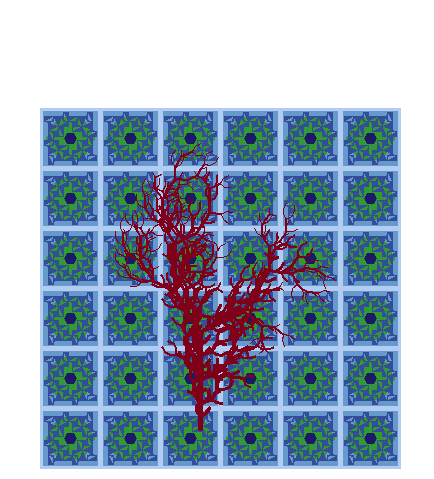
An image of at least 20 tiles (5 x 4) is required image 4.
Extensions
- Make non-square tiles. Rectangles are easy, hexagons, triangles, or n-gons are a real extension.
- Make new L-systems and add characters to the vocabulary that do interesting things.
- Modify drawString so that when drawing a tree the branches droop down like gravity is pulling at them.
- Create a sequence of images to build an animation.
- Make more tile functions and mix them around in the mosaic function.
- Make more shape classes that do interesting things. Making a fixed sequence of characters is easy. Make a shape class where the strings are the result of executing a function. L-systems are one example of a dynamically created string, but there are many other ways to do that.
Writeup and Hand-in
Turn in your code by putting it into your private handin directory on the Courses server. All files should be organized in a folder titled "project9" and you should include only those files necessary to run the program. We will grade all files turned in, so please do not turn in old, non-working, versions of files.
Make a new wiki page for your assignment. Put the label cs151f16project9 in the label field on the bottom of the page. But give the page a meaningful title (e.g. Stephanie's Project 9).
Your writeup should follow the outline below.
- A brief summary of the task, in your own words. This should be no more than a few sentences. Give the reader context and identify the key purposes of the assignment. Each project has both a coding/learning purpose (e.g. learning about dictionaries) and a non-coding objective (e.g. creating complex scenes).
- A description of your solution to the tasks, including any images you created. This should be a description of the form and functionality of your final code. You may want to incorporate code snippets in your description to point out relevant features. Note any unique computational solutions you developed.
- A description of any extensions you undertook, including images demonstrating those extensions. If you added any modules, functions, or other design components, note their structure and the algorithms you used.
- A brief description (1-3 sentences) of what you learned.
- A list of people you worked with, including TAs, and professors. Include in that list anyone whose code you may have seen, such as those of friends who have taken the course in a previous semester.
- Don't forget to label your writeup so that it is easy for others to find. For this lab, use cs151f16project9.