 Fall 2019
 Agent-Based Simulations
The main purpose of this project is to give you an opportunity to use your linked list within the context of an agent-based simulation.
In this week's simulation, we will have Agents that are on a 2D landscape. They will have positions in a continuous (floating point) 2D space, rather than the grid from the Game of Life. Like in the Game of Life, the agents are active and will implement an updateState method.
For this simulation, we won't have the concept of a scale factor, or you can think of the scale factor as being 1 so that coordinates map to pixels. If your Landscape's size is 500 by 500, then the Agents' positions should be between 0 and 500.
The Agent-based simulations were inspired by Growing Artificial Societies by Epstein and Axtell, two of the first researchers to make use computational modeling to examine social science questions about self-organizing societies.
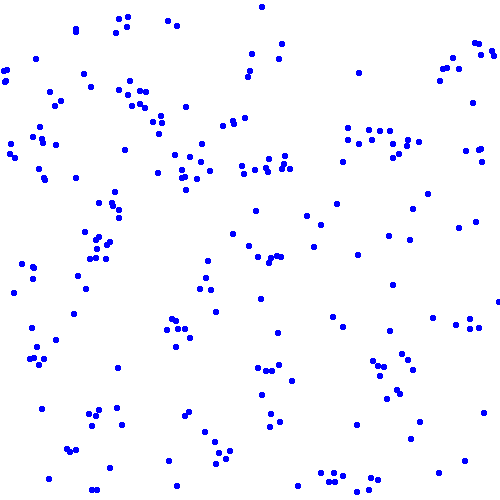
Here is a GIF example of a working simulation in action:

Tasks
Agent Class
Create an Agent class. It is up to you whether or not you want to make it abstract, but the instructions are written as if it is not. The simulations will require making two forms of agents with different updateState() methods. This is an ideal situation for using inheritance, which means starting with a base class: the Agent class.
The Agent class needs fields to store its x and y position. Use type double for the agent's position.
The Agent class should implement the following methods:
public Agent(double x0, double y0)a constructor that sets the position.public double getX()returns the x position.public double getY()returns the y position.public void setX( double newX )sets the x position.public void setY( double newY )sets the y position.public String toString()returns a String containing the x and y positions, e.g. "(3.024, 4.245)".public void updateState( Landscape scape )does nothing, for now.public void draw(Graphics g)does nothing, for now.
Remember to import java.awt.Graphics so the compiler knows about the Graphics type.
Write a simple main method to test your class and the methods except for updateState and draw. You will need to comment out updateState until you have written the Landscape class
Test functions for each class will become a standard part of each project and should be something you do automatically as you write code.
SocialAgent
Create a SocialAgent class. The first agent we will implement will ultimately move towards other agents, creating groups of agents. SocialAgent will extend the Agent class.
public class SocialAgent extends Agent {
Give the child class a boolean field, moved, which will indicate whether the agent moved during its last updateState. It should also have a field that specifies the radius R within which it considers another agent a neighbor.
The new class will need to override the constructor, updateState, and draw methods. We will save updateState for a later task. For now, implement the following methods:
- The constructor, which calls the super class constructor and sets the radius field.
public SocialAgent(double x0, double y0, int radius) {
    super( x0, y0 );
    // remainder of constructor code
}
public void setRadius(int radius)sets the cell's radius of sensitivity to the value of radius.public int getRadius()returns the cell's radius of sensitivity.public void draw(Graphics g)draws a circle of radius 5 (i.e. it fits in a 10x10 box) at the Agent's location. Pick two colors for the agent, a darker and a lighter version of the same hue (e.g. dark blue and light blue). If the agent moved during the last updateState, it should be drawn with the lighter color, otherwise the darker color.
Write a test method for the SocialAgent class. You can use your test function for the Agent class as a template. Be sure to test any new functions or fields not in the Agent class.
Landscape
Create a class called Landscape. It serves the same purpose as the Landscape in the Game of Life simulation, but is different enough that you probably don't want to copy the old one and edit it. Start with a new file. The Landscape will need fields to store its width and height (as ints) and a LinkedList of Agents. Use your implementation of a linked list). The Landscape needs the following methods:
public Landscape(int w, int h)a constructor that sets the width and height fields, and initializes the agent list.public int getHeight()returns the height.public int getWidth()returns the width.public void addAgent( Agent a )inserts an agent at the beginning of its list of agents.public String toString()returns a String representing the Landscape. It can be as simple as indicating the number of Agents on the Landscape.public ArrayList<Agent> getNeighbors(double x0, double y0, double radius)returns a list of the Agents within radius distance of the location x0, y0.public void draw(Graphics g)Calls the draw method of all the agents on the Landscape.
Write a test method for the Landscape class. Test everything but the draw method. At this point, you can also uncomment the updateState methods of the Agent and SocialAgent classes.
Visualization
Make it possible to visualize your Landscape. Download the LandscapeDisplay.java file. It is almost identical to last week.
Test your visualization by running LandscapeDisplay as your main program. The main program adds 200 agents to the Landscape and then displays them.
updateState( )
Add a method to your SocialAgent class, public void updateState(Landscape scape). It should implement the following rules.
If the cell has more than 3 neighbors (Agents besides itself) within a radius of R
    with a 1% chance
        the cell should move randomly in x and y within the range [-10,10)
else
    the cell should move randomly  in x and y within the range [-10, 10)
The Cell's motion should be a continuous value between +10 and -10 in both X and Y, and the movements in X and Y should be different random values. The Random class's nextFloat or nextDouble method provides a random floating point value in the range [0, 1.0).
As you code this function, if the SocialAgent moves, set the moved field to true, otherwise set it to false.
Test the update state by creating a Landscape with four agents on it at locations (5, 5), (10, 10), (15, 15), and (20, 20). Call updateState on the agent at (5, 5) and have it print out the number of neighbors within a radius of 10 (there should be 1 besides itself). Reset the Cell positions and then repeat at radius 15 (there should be 2 besides itself), then reset and try a radius of 25 (there should be three).
It is your own design choice to decide whether to include an Agent in the neighbors list if the agent is at exactly at the location passed in as x0, y0.
updateAgents( )
Add a method to your Landscape class, public void updateAgents(). The method should update the state of each agent, in a random order. Use the linked list shuffled array method to get an ArrayList of Agents in randomized order, then use a foreach loop to call each agent's updateState method.
SocialAgentSimulation
Create a SocialAgentSimulation class. It should be modeled after the LifeSimulation class. It would be best to control the Landscape size and the number of agents from the command line, but it is acceptable to hard-code them. Generate and randomly place N agents (N = 200 is reasonable) on the Landscape. Then loop over the time steps, calling updateAgents, repaint, and Thread.sleep as in LifeSimulation. Use a good size radius, such as 15-25, to start your simulation. Do your agents clump together?
- Include in your report a picture of the end of the simulation, noting the radius of sensitivity used.
- Include in your report a second picture of the end of a simulation that uses a radius that is twice as big as the first case. Note any differences.
Required simulation image set
CatSocialAgent
Create a CatSocialAgent class that extends the SocialAgent class. This is a second agent, since CatSocialAgent is a SocialAgent and SocialAgent is an Agent, CatSocialAgent is also an Agent.
public class CatSocialAgent extends SocialAgent
The new class should have an integer field category. It need to implement or override the following methods.
public CatSocialAgent(double x0, double y0, int cat)calls the parent constructor and set the category.public int getCategory()returns the category value.public String toString()returns a single character string indicating the category.public void draw(Graphics g)draws a circle of radius 5 (i.e. it fits in a 10x10 box) at the Agent's location. Different categories should have different colors, and each category will need a darker color (didn't move) and a lighter color (moved).public void updateState(Landscape scape)implements the following rule.Identify how many neighbors within the cell's readius of sensitivity have the same category (use
this.getCategory()) and how many have a different category.If there are >= 2 other agents with radius R and more of them are the same category with a 1% chance move randomly within the range [-10, 10] in x and y. else move randomly within the range [-10, 10] in x and y.As with the SocialAgent, set the moved field to true if the Agent moved during the update process.
CatSocialAgentSimulation
Create a CatSocialAgentSimulation class. Model this class after SocialAgentSimulation, using CatSocialAgents instead of SocialAgents. Demonstrate it using 2 categories.
Run at least the following three experiments and compare and contrast the results.
- Run the simulation with a small radius (e.g. 20). Note the degree of clumping and how many agents are still moving around after 200 iterations.
- Run the simulation with a medium radius (e.g. 40). Note the state of this simulation after 200 iterations.
- Run the simluation with a large radius (e.g. 80-100). Note the state of this simulation after 200 iterations.
Include a screen shot of the end of each simluation in your report.
Extensions
The following are some suggested extensions. You should feel free to pursue your own custom extensions to your project that you find interesting. Please clearly identify your extensions in your report. In your code, make sure the baseline simulations run properly. Making a separate sub-folder for major extensions is recommended.
- Try creating other agent types that implement different rule sets. Be intentional about your agent design.
- Instead of making separate main classes for each type of simulation, write just one Simulation class and make it possible for the user to control the type of SocialAgents from the command line. Let them control the radius and other parameters as well.
- Mix and match different agent types and write about what happens. Do this in an intentional manner.
- Try out additional SocialAgent subclasses with different update rules.
- Experiment with the effects of modifying some of the update rules. These should be compare and contrast. Try to avoid comparing simulations where more than one thing has been changed.
- For any assignment, a good extension will be to implement a Java class that you haven't implemented in the past projects and demonstrate that it has the same functionality as the Java class. In this project, ArrayList would be a good class to try.
- Re-implement the LinkedList using an array-based method instead of a Node-based method and show the functionality is identical.
Report
Your report should have the following format.
- Abstract: a brief summary (200 words or less) of the task, in your own words. give the reader context and identify the key purpose(s) of the project. You can assume the reader has read your prior assignments.
Writing an effective abstract is an important skill. Consider the following questions while writing it.
- Does it describe the CS concepts of the project?
- Does it describe the specific project application?
- Does it describe your the solution or how it was developed?
- Does it describe the results or outputs?
- Is it concise?
- Are all of the terms well-defined?
- Does it read logically and in the proper order?
- An explanation of your solution, focusing on the interesting bits. In this assignment, for example, the update rules are the interesting bits.
- Printouts, pictures, or results to show what you did. For this assignment, you should include animated gifs or screen capture videos for each of the required SocialAgent classes and at least one for each additional SocialAgent subclass you implement.
- Other results to demonstrate extensions you undertook. If you tried alternative update rules, for example, show how those affected the overall simulation results.
- A brief conclusion and description of what you learned.
- A list of people you worked with, including TAs, and instructors. Include in that list anyone whose code you may have seen, such as those of friends who have taken the course in a previous semester.
Handin
Make your report for the project a wiki page in your personal space. If you have questions about making a wiki page, stop by my office or ask in lab.
Once you have written up your assignment, give the page the label:
cs231f19project4
You can give any wiki page a label using the label field at the bottom of the page. The label is different from the title.
Do not put code on your report page or anywhere it can be publicly accessed. To hand in code, put it in your folder on the Courses fileserver. Create a directory for each project inside the private folder inside your username folder.