CS 333 Programming Languages
Project 3
Due: Thursday, March 12 2026, 11:59 pm
Part I: C Syntax
The purpose of this part is to understand the usage of .h and .c files and the concept of prototype in C.
You will implement a stack by using an array in this part. Your program should be able to use the stack to hold a list of integers and print out the list in the original order and the reverse order.
Tasks
- Create a
cstk.h. The .h file should contain the necessary structures and the declarations of the basic functions of a stack. In this project, you will need the following structure and basic functions.typedef struct Stack { int *data; // this is a pointer to the start of the data for the stack int *top; // this will point to the next place to insert in the stack int capacity; // this is the maximal size of the stack } Stack; Stack *stk_create(int)creates a Stack with a maximal capacity specified by the int valueint stk_empty(Stack *)returns 1 if the given Stack is empty, otherwise 0.int stk_full(Stack *)returns 1 if the given Stack is full, otherwise 0.void stk_push(Stack *, int)adds a new value to the top of the stack if there's space. If there's no space, prints out a warning but does nothing (and doesn't crash).int stk_peek(Stack *)returns the value on the top of the stack if such a value exists. Otherwise, prints out a warning and returns 0.int stk_pop(Stack *)removes and returns the value on the top of the stack if such a value exists. Otherwise, prints out a warning and returns 0.void stk_display(Stack *, int)prints out the list in the reverse order (LILO) if the int value is 1, otherwise, prints out in the original order (LIFO).void stk_destroy (Stack *)frees up the memoryStack *stk_copy(Stack *)copies the contents into another Stack of the same maximal size and returns it.- Create a
cstk.cfile. This file should contain the implementation of the basic functions declared in the cstk.h file. - Download cstktest.c. Read the code and
understand it. Compile and run the code as follows:
gcc -o cstktest cstktest.c cstk.c./cstktestFix your code until all tests are passed and the output displays as described.
In your report, include a screenshot of the output.
- Report:At the end of the test file is a commented out section referring to checking the functionality of stk_destroy. First, uncomment the lines, open up your relevant resource monitor, and record a video that shows despite the "infinite" creation of stacks, your computer's memory doesn't get used up. Include this video in your submission folder or include a link to the video in your report.
-
Report: Your goal is to demonstrate that your code works correctly and that you can represent visually how memory is manipulated by it.
- Draw the stack and heap (with address labels) for the code at Mark 1 and Mark 2 in this c file and include text explaining your drawings. To do this, you
will need to add code to print out the addresses of the pointers. Here is a model of what we are looking
for, but with a simpler example.
/**
 * Simple Heap Allocation Code
 *
 * Stephanie Taylor
 * Spring 2024
 */

#include
#include

int main (int argc, char **argv) {
    int *a = (int *)malloc( sizeof(int)*4 );
    int i;
    printf( "a is at %p\n", &a );
    printf( "i is at %p\n", &i );

    printf( "array starts at %p\n", a );
    for (i = 0; i < 4; i++) {
        a[i] = i*2;
    }
    // Mark 1 (first memory picture)

    free( a );
    // Mark 2 (first memory picture)

	return 0;
}
Leads to this image at Mark 1. Enough space for 4 ints has been allocated on the heap and is pointed to by the variable
a.iis the loop control variable, and its value is 4 after the loop.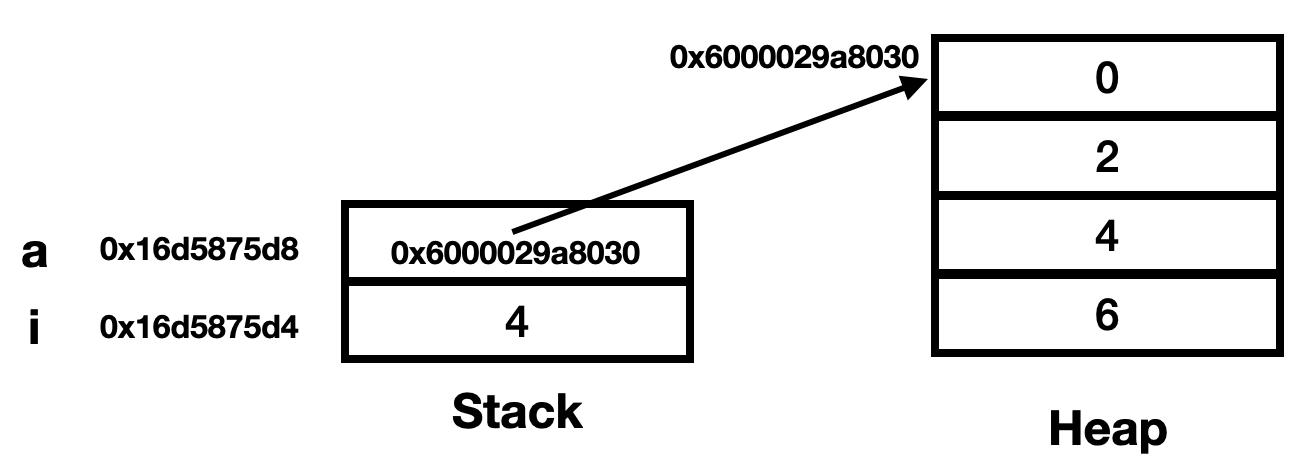
And this image at Mark 2. The space on the heap has been made available to later calls to malloc. I drew it as if it has disappeared. The value of
astill has the same address in it, but we aren't supposed to go to that address.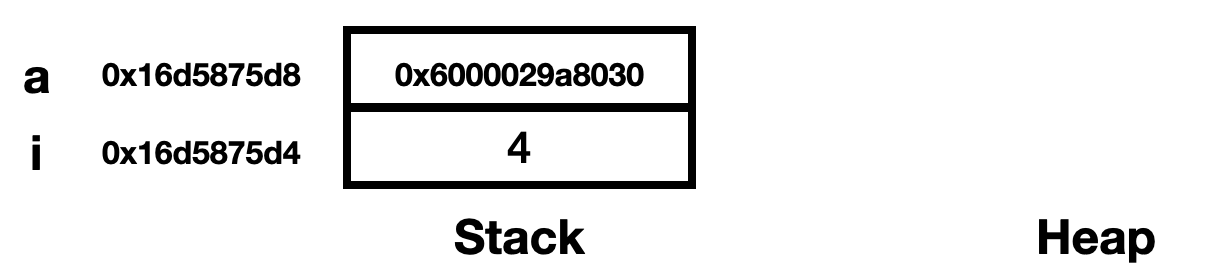
- Draw the stack and heap (with address labels) for the code at Mark 1 and Mark 2 in this c file and include text explaining your drawings. To do this, you
will need to add code to print out the addresses of the pointers. Here is a model of what we are looking
for, but with a simpler example.
Part II: Syntax of Selected Languages
In this project you'll start learning your selected language.
Tasks
-
Write an sample program in the selected language that demonstrates the rules for identifier naming, variable declarations and identifier scoping. Focus on any special rules or capabilities of your language. Name your program to task1.xx (e.g. task1.py, task1.java). Make a Google Sites page for this project, and have a section on the page for the sample code and a brief explanation of how the scoping rules apply to the language. This should be written as a tutorial for someone learning how to create variables and use them.
-
Write an example program in the selected language that executes a binary search on a list or array of numbers. Make it a function/method, if possible. Name your program to task2.xx. Make a section on the project 3 Google Sites page that explains the basic syntax of the language, including how to create a function/method and how to use control flow statements, using the binary search program as an example.
-
Write an example program in the selected language that demonstrates all of the basic built-in types and how to construct aggregate types (e.g., records, classes or structures). The program should demonstrate which of the standard suite of operators (+-/*%) manipulate which types and what the resulting type of each operation is. Use it to explain the type system in your language on the project 3 Google Sites page. Name your program to task3.xx.
Extensions
- A perfectly acceptable extension for any assignment going forward is to do a second language. You are encouraged to pick the second language from List B or C.
- Write other example programs that show unique features of the syntax, naming, or scoping in the selected language.
- Develop explicit comparison code in Python, Java, or C and compare and contrast it with your selected language.
- If the selected language has a built-in capability for binary search, include an example of using it.
- Come up with an example of just how horribly you can write the binary search program using the selected language, making it as difficult as possible to understand what is going on. Use this as an example of how syntactic or semantic rules permit obfuscation.
- Make a compilable and runnable haiku in the selected language. Less strict forms of poetry are also acceptable. Note, this is generally a minor extension in terms of points, but it can be fun.
- Make your stack more robust so that it can handle the overflow errors, or expand automatically as needed. Create more functions for the stack library.
Please note that it is your responsibility to explicitly indicate the extensions you have undertaken. If you complete extensions for the C stack, please indicate explicitly in the code and README file. If you complete an extension in a selected language, please indicate explicitly on your Google Sites page.
Submission
The submission of this project has two components:
- Create a folder for Project3_<username>. Place the required files into it, zip it, and upload it to the Google Classroom.
Required Files:
- Code: Create a fold for each language, including C and your selected language(s). Place all of your C code and selected language programs to corresponding folders. It should be clear which files correspond to which tasks. All these language folders should be placed into the Project3_<username> folder. Note that the quality of your comments counts toward your grade.
- README: We use markdown files for README files. Markdown files are files with the
.mdfilename extension. Each project should have a README file along with all your source codes. The README file will contain:- Project identifier, your name, and the submission date.
- The URL of your Google Sites report.
- The directory layout for your hand-in folder. You can use the Unix
treecommand to generate this. - Your operating system and C compiler (e.g. use gcc --version).
- For each task, include how to compile your program, how to run your program, known bugs if there is any, and the program output (a screenshot). The screenshot should include the actual output of running the program if the output is no more than 100 lines. Otherwise, give a brief version of the output.
- Text and images reporting on the C part of the project.
- A description of each extension you undertook (for the C part of the project).
You can follow the instructions for the README file from Project 1.
- Google Sites Report: The report of this project should have the following elements.
- Title of the project and your name
- A section for each task of part II. Every section should contain the snapshot of your sample programs, the outputs, and your explanations.
- If you complete extensions in your selected language, please include a section for each extension, providing sample programs, outputs, and explanations.
To check whether you've made your report well organized, please follow the Organization part in the Google Sites section in this writing page. Remember to publish all your changes and include the homepage link of your CS333 Google Sites in the README file.
Please do NOT include: Executable files. On Windows, these have the .exe extension. On Mac and Linux, there is no e xtension. We have found that graders often have difficulty downloading submissions if they contain executable files.
© 2026 Ying Li. Page last modified: .