 Fall 2020
 Word Trends
The main purpose of this project is analyze trends in 8 years of Reddit posts. The first analysis will be to find the most common words in each year. Using a heap data structure to store the word count information is an efficient way to implement the task. The second analysis will be to look at the trends of specific words of your choice over the time period of the data.
Tasks
- Write a CommonWordsFinder class
Create a CommonWordsFinder class that is able to read a word count file and report the the most common words.
The CommonWordsFinder class can either (1) use a WordCounter class to read the file into a BSTMap or HashMap and then insert all of the words into a PQHeap, or (2) write a method that reads the word count file and dumps the words straight into a PQHeap. In both cases, the comparator should use the Value field (frequency) to determine priority. Dumping the values directly into a Heap will be faster.
Test your class using counts_ct.txt. Debug it until it works properly.
Set up your main function so that it can take in a number N followed by one or more filenames of word count files on the command line. The function should loop over the filenames and for each one print out the N most frequent words along with their frequency (count / total word count). When comparing different years, it is important to report the frequency, rather than the count, because each file has a different number of words. Think about how you can structure the printout to make it easy to create a table (e.g. use CSV formatting).
Usage: CommonWordsFinder <N> <WC file 1> <...>
Reports the N most common words in each provided Word Count file.
Run your code on the Reddit comments for all of the years 2008 through 2015 and report the 10 most frequent words for each year in a table. Do the most frequent words change much?
- Write a WordTrendsFinder class
Create a WordTrendsFinder class that determines the frequency of a specific set of words across many different word files. For example, you could use command line arguments to specify the names of multiple word count files and then a set of words to extract from those files. The purpose is to track word frequency across several years of reddit comments.
For this task you do not need a heap; use the BSTMap or HashMap generated by readWordCount method in your WordCounter class to access the count/frequency of the desired words
For example, you could design your main program to require inputs formatted according to this usage statement:
USAGE java WordTrendsFinder <BaseFilename> <FileNumberBegin> <FileNumberEnd> <Word1> <Word2> ...
 where <BaseFilename> contains the text part of the name of each WordCount file to analyze.
 and <FileNumberBegin> specifies the first file's number suffix
 and <FileNumberEnd> specifies the last number suffix in the range of word files to analyze.
 <Word1> <Word2> ... is the list of words to analyze.
To generate the graph shown as follow
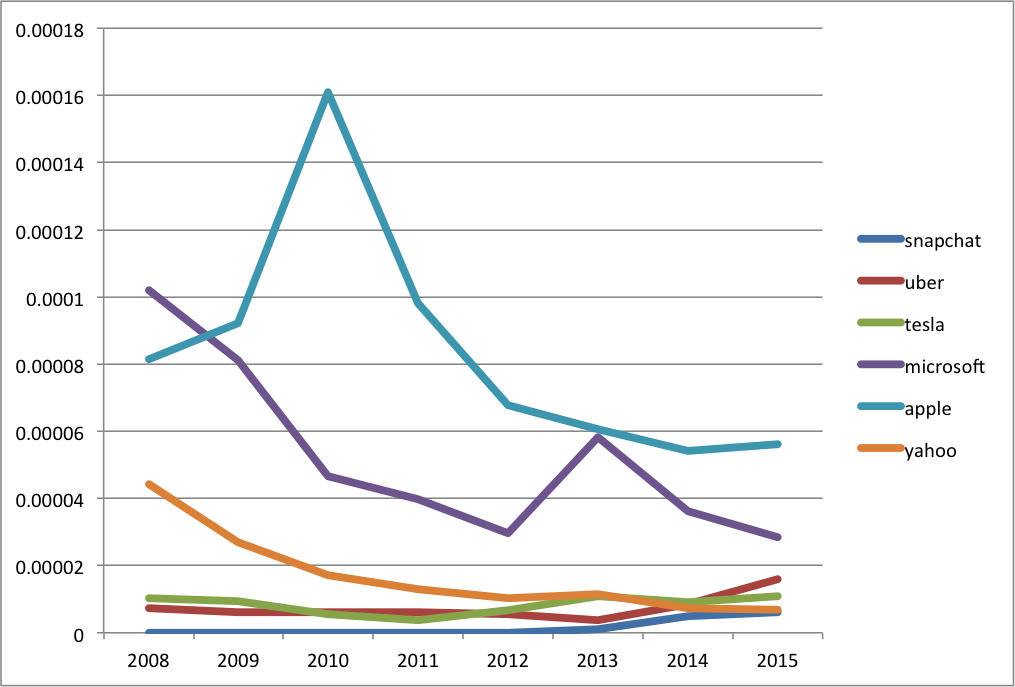
Using this command line ordering, the following command should produce something like the output below.
java WordTrendsFinder ../proj08/counts_reddit_comments_ 2008 2015 snapchat uber tesla microsoft apple yahoo
You can copy-paste the output to a spreadsheet, add years as column headers, and plot the results as lines. Sometimes you may need to press the "Switch Plot" button to switch the rows and columns.
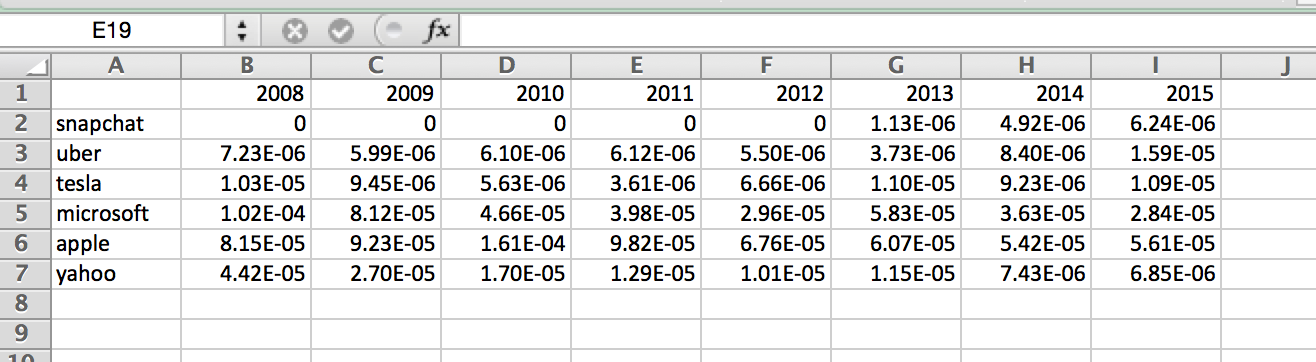
If you want to save yourself time, output the data as a comma-separated value [CSV] file, including the headers, which can be read directly by a spreadsheet program.
Call WordTrendsFinder with a list of approximately 6-10 words. Choose a theme for the words that you think may trend over 8 years, keeping in mind that the comments are all collected during the month of May. It is a good idea to use words that are not particularly common, such as proper names. The following are some example lists you could use:
- sony portal ipad syntax facebook friend,
- phelps usain raisman arod peyton,
- clinton sanders rubio trump obama romney cruz palin.
While you are welcome to use these lists, you are encouraged to develop your own.
- Generate a graph of the word frequency trends
Generate a line graph with your results and include it in your report. Your report should also include an analysis of the output. Are these trends expected? unexpected? What events at the time could explain the trends? Think about these questions when you make your lists.
Extensions
The following are some suggested extensions. You should feel free to pursue your own custom extensions to your project that you find interesting. Please clearly identify your extensions in your report. In your code, make sure the baseline simulations run properly. Making a separate sub-folder for major extensions is recommended.
- Use more than one list of interesting words and report the trends, including an analysis of the trends and what might explain them.
- An alternative method of identifying the top N words is to read them into an ArrayList and sort them. Do a time comparison of this method with using the heap.
- You can build a node-based or an array-based heap. Whichever one you choose, implement the other and do a time comparison (try to make it as fair as possible). Which one is faster? Which one is more memory efficient?
- Write a balanced tree implementation (e.g. AVL Trees or Black-Red trees) and compare it with your basic BSTMap class and the Hashmap.
- For any assignment, a good extension will be to implement a Java class that you have't implemented in the past projects and demonstrate that it has the same functionality as the Java class.
Report
Your intended audience for your report are your peers not in the class, but who have taken a CS course. Your report should explain the core CS concept used, present the results of your program, and discuss the meaning of the results: what did you discover and does it make sense?
Your project report should contain the following elements. Please include a header for each section.
- Abstract
A brief summary of the project, in your own words. This should be no more than a few sentences. Give the reader context and identify the key purpose of the assignment. Each assignment will have both a core CS purpose--usually a new data structure--and an application such as a simulation or analysis.
Writing an effective abstract is an important skill. Consider the following questions while writing it.
- Does it describe the CS concepts of the project (e.g. writing well-organized and efficient code)?
- Does it describe the specific project application?
- Does it describe the data structure you used?
- Does it describe the results of your simulation or analysis?
- Is it concise?
- Are all of the terms well-defined?
- Does it read logically and in the proper order?
- Results
Present your results. Include text output, images, tables, graphs, or qualitative descriptions, as appropriate. Include a discussion as to whether the results make sense and what they mean. For this assignment, you should include a table of the high frequency words and a plot of the word trends for your interesting word list.
- Extensions
Describe any extensions you undertook, including text output, graphs, tables, or images demonstrating those extensions. If you added any modules, functions, or other design components, note their structure and the algorithms you used.
- References/Acknowledgements
A list of people you worked with, including TAs and instructors. Include in that list anyone whose code you may have seen, such as those of friends who have taken the course in a previous semester.
Handin
Please do not submit the reddit text files along with your code.
Here's a checklist of everything you should do when you are finished with a project and are ready to turn it in.
+ Create a report and export to pdf
- Create a report in your favorite document application (Microsoft Word, Google Doc, Libre Writer). Make sure to have all the sections described above.
- Print to PDF (Windows)
- Open a file in a Windows application.
- Choose "File > Print".
- Choose "Adobe PDF" as the printer in the Print dialog box.
- Click Print. Type a name for your file, and click Save.
- Print to PDF (Mac OS)
- Open a file in a Mac OS application.
- Click the "PDF" button and choose "Save As Adobe PDF".
- Choose the "Adobe PDF Settings" and click "Continue".
- Type a name for your file, and click "Save".
- Export to PDF Google Drive
- Choose "File" > "Download" > "PDF Document (.pdf)"
+ Zip your project folder
- Name your project folder with your Colby username and the project number. For example, I would name mine
hewolfe_p8. - Create a zip file of your project.
- On macOS, right-click the project folder (e.g.
colbyUsername_p08) and clickCompress "Project08".

- On Windows, right-click the project folder (e.g.
colbyUsername_p08) and click "Compressed (zipped) folder" in the "Send to" menu.

- On macOS, right-click the project folder (e.g.
+ Submit your project zip folder and report on Moodle
- On Moodle, click the ‘Add submission’ button to bring up the file upload page.
- Upload the relevant file into the submission. you can ‘drag and drop’ the file into the submission box.
- Click ‘Save Changes’.
- If changes are required, click on ‘Edit my submission’.
- Once ready to submit, click ‘Submit assignment’.
- Note that once the assignment is 'submitted’ no further changes are allowed.