Word Frequency
The main purpose of this project is to provide you the opportunity to use your BSTMap to determine the frequencies of all the words in a given text document. The ability to identify word frequencies in a large corpus has been the basis for a number of different research projects in the digital social sciences. In particular, looking at word usage over time in books and articles has revealed how culture and language change.
This project is the first of a series of 3 projects that will allow you to analyze the topics in Reddit comments over a period of 8 years. The text files are large enough that using a list or an otherwise inefficient implementation will take a prohibitively long time to do the analysis.
Note: please do not hand in the Reddit comment files with your code. If everyone hands them in with their code, it takes up a lot of unnecessary space on the server.
Tasks
Testing
As always, as you are coding up this project create testing files for each class you create exercising the public methods implemented in this class.
WordCounter Class
There is only one additional class you need to write this week - WordCounter. It is the class that
creates and manages a BSTMap of word-count pairs KeyValuePair<String, Integer>. The
WordCounter class needs methods for doing three things.
First, the WordCounter needs to be able to Build a BSTMap from a text document. The method should read in the text and separate it into words. For each word, it should check to see if the word is already a key in the BSTMap. If it isn't, then it should add the Key-Value pair to the dictionary with the word as the key and 1 as the value. If word is an existing key, then it should increment the value associated with that word.
Second, the WordCounter needs to be able to write out a file containing the key-value pairs of the Map. The file should have the total number of words on the first line, and each word and its count on the subsequent lines (one key-value pair per line). We will refer to a file formatted like this as a word count file.
Finally, the WordCounter needs to be able to Read a word count file, recreating the BSTMap so it can be used for further analysis. This will be important because the original text files may be much larger than the word count files.
- Setup
The WordCounter class will use the following Java packages:
import java.io.BufferedReader; import java.io.FileNotFoundException; import java.io.FileReader; import java.io.IOException; - Begin the WordCounter class
The class needs a field to hold the BSTMap with types <String, Integer>. It also needs a field to hold the total word count.
- Create the WordCounter methods
public WordCounter()- constructor that makes an empty BSTMap and sets the total word count to zero.public void analyze(String filename)- generates the word counts from a file of words. This method should use the BufferedReader to read in the file one line at a time. It should also use the String's split method to separate each line into words. Your code will be similar to the Board class file reader in the Sudoku project, including the need to use a try-catch structure to enclose your code. See lab 3 for the code template or look at your own code.Given a String line read from a file, you can use the following code template to split the line into words and then process each word.
            // split line into words. The regular expression can be interpreted
            // as split on anything that is not (^) (a-z or A-Z or 0-9 or ').
            String[] words = line.split("[^a-zA-Z0-9']");
            for (int i = 0; i < words.length; i++) {
                String word = words[i].trim().toLowerCase();
                // Might want to check for a word of length 0 and not process it
                // Write code to update the map
            }
Each valid word should increase the total word count, whether or not it already exists in the Map.
public int getTotalWordCount()- returns the total word count (note that this is not the number of unique words, which would be the size of the BSTMap - it is the total number of words in the document that was originally read in).public int getUniqueWordCount()- returns the number of unique words, which should be the size of the BSTMap.public int getCount( String word )- returns the frequency value associated with this word.public double getFrequency( String word )- returns the value associated with this word divided by the total word count. Use a cast to ensure this is a floating point calculation.
- Write a main method to test your code
In your main method, create a WordCounter object and then have it analyze the file counttest.txt. It should generate the tree shown below. (You might want to enable your main function to get the filename of the document to analyze as a command-line parameter.)
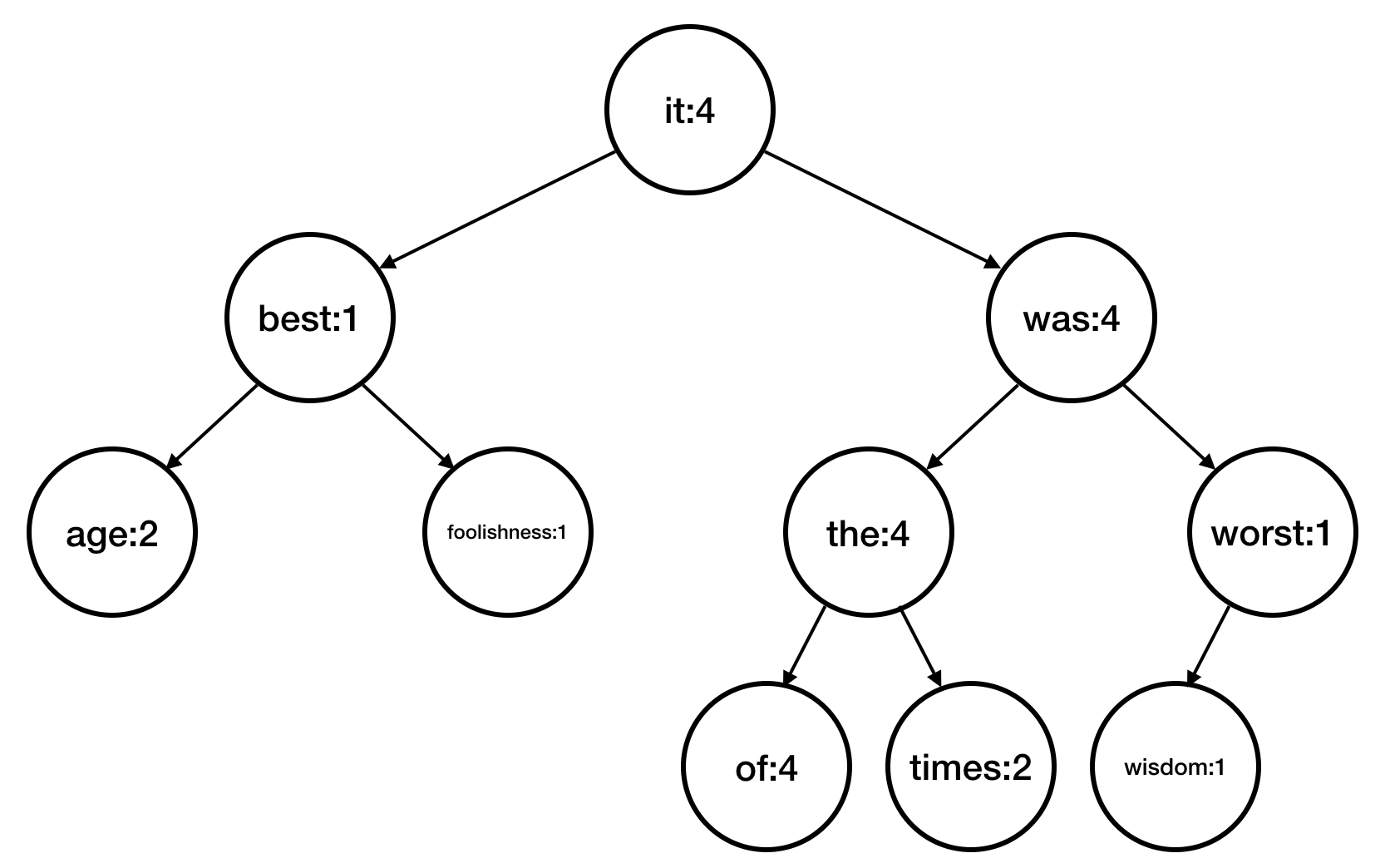
The following is one possible kind of output from the BSTMap's toString() method created using a pre-order traversal.
root    it:4
left       best:1
left          age:2
right         foolishness:1
right      was:4
left          the:4
left             of:4
right            times:2
right         worst:1
left             wisdom:1
- Define a method to write a BSTMap to a file
Create a method that writes the contents of the BSTMap to a word count file.
public void writeWordCountFile( String filename )On the first line of the file, the method should write the string "totalWordCount : " and the value of the total word count. For each subsequent line, the method should write each key value pair separated by spaces. For example, the word count file for counttest.txt could be the following.
totalWordCount : 24
it 4
best 1
age 2
foolishness 1
was 4
the 4
of 4
times 2
worst 1
wisdom 1
Write the word count file using a pre-order traversal of the tree.
Use the FileWriter class to write the file. It has a write method that writes a string to the active file. Be sure to close the file when you are done with it.
- Define a method to read the contents of a BSTMap file
Write a method that reads the contents of a word count file and reconstructs the fields of the WordCount object, including the BSTMap.
public void readWordCountFile( String filename )Read in the file, using the FileReader and BufferedReader classes. Use the split method to separate the values on a line. Make sure you read in the first line separately, since it contains the total word count. To reconstruct the tree, call the BSTMap's put method every time you parse a new key-value pair.
- Add a command-line parameter to the WordCounter main method
Update the WordCounter main method be able to take the input and/or output filenames from the command line. For each input filename, your program should generate a word count file. You may want to have your program be able to take in multiple files to process. Use the function System.currentTimeMillis() to get the time before and after you analyze a file and print out the amount of time each file takes to process. Test this with the counttest.txt.
On the Courses server in the Course Materials folder, are 8 files (reddit_comments_2008.txt through reddit_comments_2015.txt) containing a random selection of user comments from the month of May during each of the years from 2008 to 2015. Process these files and generate a word count file for each one. Each file is large (90-230MB), so it may take some time both to download the files and to run the code. Keep track of the time it takes to process each file.
The files are large, and Java may not be set up to allow you to use that much memory. You can increase the amount of memory allocated to java with the -Xmx512m flag.
Use a straight-forward file-naming scheme when generating the word counts files. In the next two projects you will be looking at word frequency trends across multiple years, so you want the year from which the comments were extracted to be easy to parse from the filename.
- Execute a time analysis of computing word frequency
Generate three graphs (using your favorite software, e.g. a spreadsheet). The first two graphs should show the total word count and unique word count for each year. The third graph should show total word count (x-axis) and processing time (y-axis). What relationship do you expect to exist on the last graph? Does the graph fit your expectations?
These graphs should be scatter plots, not bar graphs.
Extensions
The following are some suggested extensions. You should feel free to pursue your own custom extensions to your project that you find interesting. Please clearly identify your extensions in your report. In your code, make sure the baseline simulations run properly. Making a separate sub-folder for major extensions is recommended.
- Develop a file with common words in it and have your WordCounter ignore those words. In your report, discuss how you developed and use the list. Does it modify the analysis time?
- Write out your tree to a word count file in an order that will ensure it is a complete tree (balanced) when you read it in. (Hint: you could sort your pairs by keys, then traverse the list as if you were traversing a complete binary tree.) Then demonstrate that it works.
- Use an ArrayList or your own LinkedList instead of a Binary Tree to implement the map and compare processing times.
- Write a toString method that prints the tree level by level neatly from top to bottom. You may need a Queue.
- Write a remove method for your BSTMap and demonstrate that it works properly.
- Have your WordCounter main function finish by printing out the 20 (or N) most frequent words in the document.
- Implement a balanced tree data structure (such as an AVL Tree) and demonstrate that it works properly.
Report
Your intended audience for your report are your peers not in the class, but who have taken a CS course. Your report should explain the core CS concept used, present the results of your program, and discuss the meaning of the results: what did you discover and does it make sense?
Your project report should contain the following elements. Please include a header for each section.
- Abstract
A brief summary of the project, in your own words. This should be no more than a few sentences. Give the reader context and identify the key purpose of the assignment. Each assignment will have both a core CS purpose--usually a new data structure--and an application such as a simulation or analysis.
Writing an effective abstract is an important skill. Consider the following questions while writing it.
- Does it describe the CS concepts of the project (e.g. writing well-organized and efficient code)?
- Does it describe the specific project application?
- Does it describe the data structure you used?
- Does it describe the results of your simulation or analysis?
- Is it concise?
- Are all of the terms well-defined?
- Does it read logically and in the proper order?
- Results
Present your results. Include text output, images, tables, graphs, or qualitative descriptions, as appropriate. Include a discussion as to whether the results make sense and what they mean. This week, be sure to present your analysis for the exploration section.
- Reflections
A semi-brief overview of the data structure implemented/used in this project. Why did we implement a BST in this project? Why was this 'the correct' data interface for this specific project, compared to say using an Array/ArrayList/LinkedList?
- Extensions
Describe any extensions you undertook, including text output, graphs, tables, or images demonstrating those extensions. If you added any modules, functions, or other design components, note their structure and the algorithms you used.
- References/Acknowledgements
A list of people you worked with, including TAs and instructors. Include in that list anyone whose code you may have seen, such as those of friends who have taken the course in a previous semester. If you found a website for help, such as StackOverflow, include a link to the post.