Project 4: Turtle race
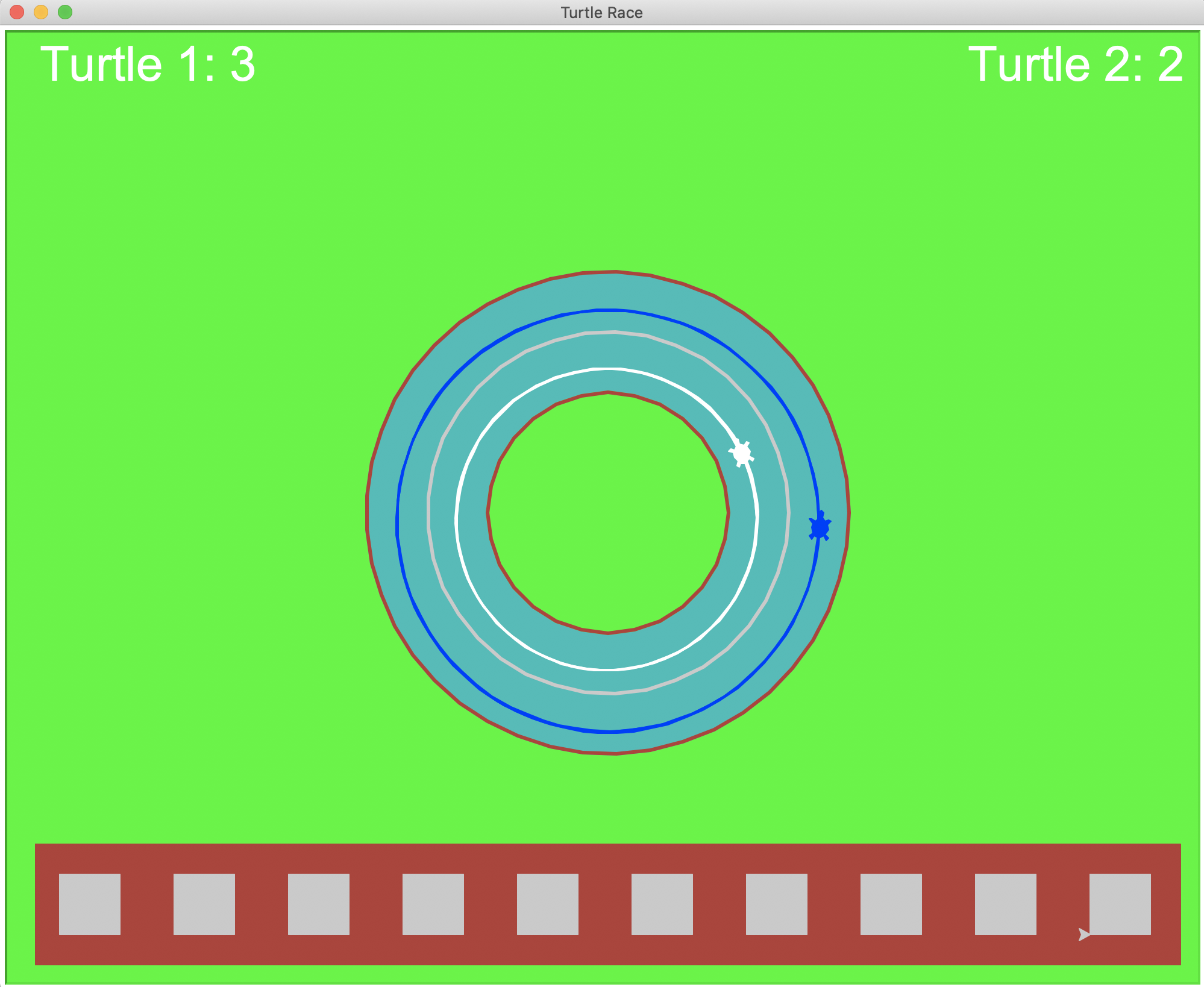
In this project, you will practice creating objects that have unique roles and properties. You will be making a scene where two turtles are racing each other in a race course that you design. Aside from the Screen object, you will create different Turtle objects, each of whom perform different roles:
- Race on the track.
- Draw the background scene (showing the race track, the audience, etc.).
- Show the score — how many laps each turtle completes (there are two
Turtle"score keepers", one per racer).
Extension points are awarded for complex scenes, especially those that show me that you can integrate concepts from lecture into making your scenes and take things to the next level!
Tasks
- Project 4: Turtle race
0. Design your race course
Decide on the shape of your race course. It doesn't need to be fancy. Keep in mind that your turtles will need to be able to go around the race course multiple times (i.e. to complete "laps"). Some ideas are:
- circular (simplest and recommended)
- linear (e.g. back-and-forth either side of the screen)
- around a simple shape (e.g. square, diamond, etc.)
1. Create object_shapelib.py
Just like better_shapelib from last week, object_shapelib.py will contain all your functions that draw shapes and the race scene. You're welcome to add as much complexity as you would like, but minimally it should contain the following functions.
For full credit, all these functions should only use a Turtle object to do the drawing. I should not see turtle.<blah> anywhere, except on the line where you create your Turtle object!
1a. goto function
Copy-and-paste the goto function that you have from better_shapelib, and update it to have the function signature:
def goto(turt, x, y, heading=0):
Do the following:
- Update the code so that it entirely consists of method calls done on the
Turtleobjectturt. - If you previously did not have a parameter for heading, make sure that you set
turt's heading to the parameterheading.
1b. Create functions that you need to draw your race track scene
The ones you need depend on your race track design and your concept for your race scene. For example, if you were using a circular track, you might use a circle function to draw the racing lanes (e.g. their outlines, fill, inner and outer lane dividers, road markers, etc.):
def circle(turt, x, y, radius, penWidth=3, fill=True, fillColor='brown'):
Keep it simple! You can always add complexity later. At minimum, each of your shape functions should have:
- A parameter for the
Turtleobject that draws your shape (e.g.turtabove). - Position parameters (e.g.
xandy). - Keyword arguments to control the appearance (e.g.
penWidthabove).
Feel free to copy-and-paste and adapt code from previous projects!
1c. draw_race_scene
This is the function that should draw your race track scene. It does NOT need to have (x, y, scale) parameters — I suggest only putting in the work to do this if you plan to take advantage of repositioning and scaling your scene as part of a larger extension.
Here is an overview of what the draw_race_scene function should do:
- Create a
Turtleobject that will draw your scene. - Call your functions from Task 1b to draw the lanes/course in which your two turtles will race one another.
- Customize the rest of the scene as much as you'd like (e.g. add bleachers, a crowd of fans, trees, etc.). You can skip this for now until you get the rest of the project working.
1d. Test your race track scene
Copy-and-paste your make_screen function from lab into object_shapelib.py.
Add main code to if __name__ == '__main__': in object_shapelib.py to test out your race scene. It should make a Screen object and draw your race scene.
Run object_shapelib.py to produce your race scene. Take a screenshot — this is Required Image 1 in your project report.
2. Create race.py
This file will place your turtles in their racing lanes and have them race. The following subtasks walk you through the general setup.
2a. Copy over make_turtle from lab into race.py
Call this function when you need to create a Turtle object.
2b. Make a main function
Your function should:
- Make a
Screenobject - Draw your race scene
- Create 4
Turtleobjects: 2 racing turtles and 2 "score keepers" (they will show how many laps racing Turtle 1 and Turtle 2 complete, respectively). - Place the racing turtles at the "starting line" of your race track (where ever you decide that to be). Make sure they are facing the right way to start racing on your track!
- The placement of the two score keeper turtles is up to you.
Important notes:
- Make sure that the two racing turtles look distinct (e.g. different colors, shapes, etc.).
- The score keeper turtles should have a color that will make their written scores readable against your background color.
Add a if __name__ == '__main__': statement in race.py that calls your main function.
If you run your code now, you should see your racing scene drawn on the screen and your two racing turtles should show up at the starting line in their respective lanes.
2c. Create the move_turtle function
Each racing turtle will move at a different speed, which means that you move them speed units on each time step of your simulation (e.g. in a loop coming up later). The move_turtle function should have one of your turtles (turt) take one "step" (the size of step is speed) and should have a signature that looks like:
def move_turtle(turt, speed):
    '''Moves the `Turtle` object `turt` `speed` units
    '''
Feel free to customize the parameters to suit your race course concept.
Hint (if using a circular course): The turtle circle method has a keyword argument that allows you to specify how much of a circle (angle) that you want to move around.
2d. Move your racing turtles around the track
After the code that you have already written in main, move each of the racing turtles 1000 times. Give Turtle 1 a speed of 5 and Turtle 2 a speed of 4.9.
If you run your code, you should see each turtle move around the track (not deviating from it). Turtle 1 should complete laps faster than Turtle 2.
Hint: If your race course requires the turtles or go back-and-forth or turn corners, you will need to change their heading after they move a certain distance or reach the end of the screen.
3. Race!
Make the race more interesting by adding the following elements.
3a. Randomly jitter each racing turtle's speed
Every time that you move one of the turtles, randomly shift its speed by at most unit.
3b. Keep score
Create variables to keep track of each turtle's "score": how many laps each turtle has completed.
Detect when a turtle completes a lap, increment the appropriate turtle's score, and display the updated score on the screen (somewhere in your scene). You may repurpose any relevant code from lab.
Take a screenshot of your final race scene in action (showing two turtles racing on your track with their scores shown). This is Required Image 2 to be included in your report.
Check reproducibility
In order to grade your project, we need to be able to run your code and get the same results as you do! Here is a summary of the expected outputs from each of the source code files that you created:
python3 race.py: Draws your racing scene and has two turtles move along the race course that you designed. The number of laps completed by each turtle racer should be displayed and updated.
If you use command-line arguments in an extension, explain what they are and provide an example way to run your code in both code comments and your report.
Extensions
Congratulations on completing the core tasks! If your code and report meet the above expectations, you’ve already earned up to 26/30 points for this project.
The remaining 4/30 are a chance for you to earn credit for exploring parts of this project and digging deeper to express your creativity! This is entirely optional; 26/30 is a B and is a perfectly respectable place to stop. Extensions are open-ended and exist to compliment the structured core project. Explore and learn something new that interests you! Concentrating your energy on 1-2 "deep" extensions that challenge you will earn you more points than many small, "shallow" extensions.
You can pick your own topics that interest you. Here are a few examples:
- Creative or complex scenes above and beyond the basic expectations count as extensions.
- Make the animation of your turtles making the collage from lab look more like code rain. Some ideas are to draw letters and numbers rather than turtle shapes, randomize which letters or numbers are drawn, have the "stamps" disappear after each the turtle has moved a certain number of times.
- Learn about lists and use them to improve the conciseness of your code.
- Add additional racing turtles.
- Design a more complex race track shape (e.g. a spiral, maze, etc.)
- Designate a winning turtle: the first turtle to complete N laps. Analyze how differences in the turtle speeds and the amount of randomness influences the chance that they win.
- Related to the previous extension, learn about the Gaussian distribution and use it to generate the random variations in the turtle speed. Analyze how factors related to how randomness is created influences the chance that either turtle wins.
- Make it so that you can position and scale your race scene. Do something interesting that takes advantage of this.
- Create a new scene and/or scenario that involves multiple
Turtleobjects in an interesting way.
Submission checklist
To turn in your project, make sure you do all of the following:
- Check the rubric on Moodle and make sure your report and code contain all the required parts.
- Move your lab folder inside your project folder (i.e. drag the
Lab04folder insideProject04). - When ready to send your code for grading, drag your project 4 folder to our grading directory on Google Drive.
- Check that your files and folders uploaded correctly.