 Spring 2021
 Solving Sudoku
This week we'll explore the game of Sudoku. In particular, you will write a stack-based solver for the game that implements a depth-first search algorithm. Once your code can solve Sudoku games, then you will explore how the number of starting values provided affects the complexity of the search for a solution.
Tasks
Board Class
The Board class holds the array of Cells that make up the Sudoku board. It will be able to read a board from a file, test if a value is valid at a certain position on the board, and test if the board is solved.
- Define the Board fields and constructor
Use your Board.java file from the lab as a starting point. Give the Board class one private field that is a 2D array of Cells. You may also want to create a
public static final int Sizethat has the value 9. Thefinalkeyword means the value cannot be changed.The default constructor should have no parameters, should create a new 2D array of Cells that is Board.Size by Board.Size, and it should initialize each location in the grid with a new Cell with value 0.
- Define a Board toString method
Write a
public String toString()method that generates a multi-line string representation of the board. To make it easy to examine the board, you may want to have spaces that separate the 9x9 board into 3x3 blocks. When you have written this function, write a main method you can run to test the constructor and the toString methods. The main method should create a new Board object and then print it. - Write the Board accessors and utility methods
public int getCols()- returns the number of columnspublic int getRows()- returns the number of rowspublic Cell get(int r, int c)- returns the Cell at location r, c.public boolean isLocked(int r, int c)- returns whether the Cell at r, c, is locked.public int numLocked()- returns the number of locked Cells on the board.public int value(int r, int c)- returns the value at Cell r, c.public void set(int r, int c, int value)- sets the value of the Cell at r, c.public void set(int r, int c, int value, boolean locked)- sets the value and locked fields of the Cell at r, c.
Note, a locked Cell is one whose value is fixed. These are the Cells in the board with fixed initial values. These Cells should never be modified while solving the board.
When you are finished with these, test them in your main function.
- Complete the Board read method
Update the read method from lab so that it fills in the board values when given a file with 9 rows of 9 digits separated by spaces.
Use the following test files to evaluate your read method. The first two files have no extra spaces or empty lines. The second two files have extra spaces and lines which you may have to modify your read method to handle. Handling the second two files is optional and a small extension.
Test your read method by updating your main function so it reads in a file, possibly using a command line argument, and prints out the resulting Board.
- Write a Board method to test if a value is valid
Write a method
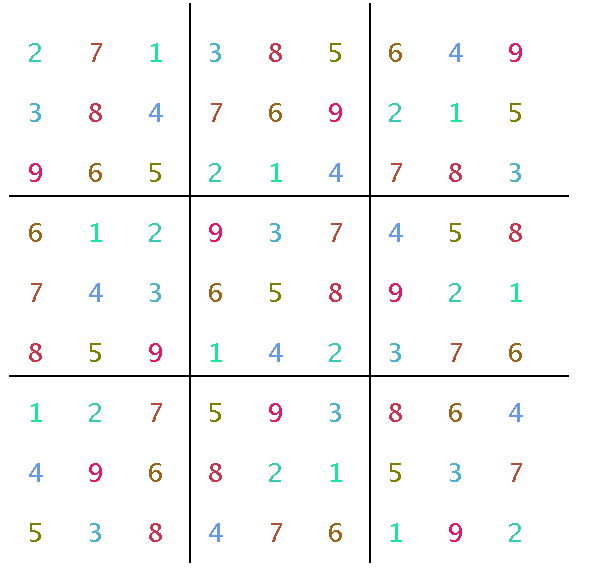
public boolean validValue(int row, int col, int value)that tests if the given value is a valid value at the given row and column of the board. It should make sure the value is unique in its row, in its column, and in its local 3x3 square. You can figure out which local 3x3 square it is in by using integer division. (Note, you probably want to test that the value is in the range [1,9] before doing anything else.)Test your function by updating your main function so that it tests values on a solved board. For example, read the solved board 10 above and check at least the following cases.
- Position (1, 1) should be valid for a 4 only.
- Position (1, 8) should be valid for a 2 only.
- Position (8, 5) should be valid for a 4 only.
- Write a Board method to test if the board is solved
Finally, write a method
public boolean validSolution()that returns true if the board is solved.You can do this by looping over all of the Cells on the board. If any of the Cell values are 0 or are not valid (see prior function) then the board is not solved. If all of the Cells are between 1 and 9 and all the Cells are valid, the board is solved.
Update your main function so that it tells you if the Board read from a file is solved or not and make sure it works.
Sudoku Class
The next task is to write the Sudoku class that will actually solve a puzzle. You need a constructor that can create a board with some initial values, a solve method, and a main method.
- Define the Sudoku fields and constructor
Create a Sudoku.java file, import java.util.Random, and create a public class Sudoku. The class should have a field for the Board object. Make a constructor that creates a new Board. By default, the Board should be all zeros.
- Define a second constructor to create interesting boards
Create a second constructor that takes in an int parameter that is the number of populated starting values N. Initialize the board to have N randomly selected valid values.
+ (more detail)
To construct a board with N valid, but randomly selected values, you will need a random number generator and a loop.
Each time through the loop generate a random row, random column, and random value. If the board already has a non-zero value there, try again. If the location does not yet have a value, then test if the value is valid in that location using your board's validValue method. If it is valid, then insert the value into the board at that location and specify it as locked. If it is not valid, then try again.
Note that the loop will likely need to execute more than N times to generate N valid values.
Once your constructor is written, test it by creating a main method that generates a board with initial values and prints it out. Use a command line parameter to control how many initial values there are.
- Write a solve method
Create a method
public boolean solve()using the following algorithm, which uses a stack to keep track of the solution and allow backtracking when it gets stuck. At a high level, the algorithm is as follows.Given: a stack, and the number of locked cells while the stack size is less than the number of unspecified cells select the next cell to check (this is where you add smarts) if there is a valid next cell to try push the cell onto the stack update the board else while it is necessary and possible to backtrack pop a cell off the stack check if there are other untested values this cell could try if there is another valid untested value for this cell push the cell with its new value onto the stack update the board break else set this cell's value to 0 on the board if the stack size is 0 (no more backtracking possible) return false: there is no solution return true: the board contains the solutionYou probably want to write a board function to find and return the next cell to check:
public Cell findBestCell()- A simple approach to selecting the next cell is to scan the board by rows from the upper left to find the first cell with a 0 value. Then start checking the possible values from 1 to 9 using the validValue method. Use the first valid value found. If the cell has no valid value, then return null, which forces the algorithm to backtrack. Don't keep searching for a cell with a value. If a cell with no valid value is found, return null.
- A more sophisticated approach is to find the cell (anywhere on the board) with the fewest valid value options and try it first. In some cases there may be only one valid value. If there is a cell with no valid options, return null so the solver can backtrack.
Once you have coded up the solve algorithm, update your main method and try it on a board with 0 initial values. It should be able to find a solution very quickly for that case. Then test it on board 10 which has a solution. Have your program print out both the initial and final boards. Make sure the solution is a valid solution by checking it yourself.
LandscapeDisplay Class
The final part of the project is to use the LandscapeDisplay to create a visualization of the board. You can download this version of the class file, which has been updated to use a Board class instead of a Landscape.
- Make a draw method in the Cell class
In your Cell class, create a draw method
public void draw(Graphics g, int x0, int y0, int scale)that draws the Cell's number. The x0 and y0 are a global offset for the board so it does not have to be smashed up against the upper left corner. The scale is how big a grid cell should be (30 or 40 are good values). you can use the Graphics drawChars method to draw a character. You can use the expression(char)('0' + this.value)to create the proper character to be drawn. If you want, make each digit a different color.+ (more detail)
For Sudoku, we want to draw only a single character, which should be a digit between 0 and 9. If you recall, using single quotes in Java gives you the ASCII value of a character. For this task, the character digit for a give value is give by the expression
(char)('0' + this.value), where this.value is the value of the Cell. You want to assign that value to the first character of a char array.The simplest thing to do is to declare a 2-element char array. Assign the ASCII value of the digit to draw to the first characer. Assign 0 to the second character. Then call the Graphics::drawText method with the char array as the first argument, 0 as the second argument (which position to draw first), and 1 and the third (number of characters to draw). Use the x0, y0, and scale factors to place the character in the right place.
- Make a draw method in the Board class
In your Board class, create a
public void draw(Graphics g, int scale)method. The method should loop over the board and call the draw method of each Cell. In addition, you may want to draw lines to divide the board into 3x3 blocks. - Add the LandscapeDisplay to the Sudoku class
In your Sudoku class, add a LandscapeDisplay field to the class. In both constructors, assign to the field a new LandscapeDisplay, passing in the board as the first argument and the scale factor (e.g. 30) as the second.
- Control the speed of the visualization
In your solve method add an int parameter delay. Then, right after incrementing the time variable, add the following code.
    if( delay > 0 ) {
        try {
            Thread.sleep(delay);
        }
        catch(InterruptedException ex) {
            System.out.println("Interrupted");
        }
        display.repaint();
    }
This will update the visual display live as it tries to solve the board. Update your main method so it calls solve with a delay of 10 (which is 10ms).
Include a picture of a solved board in your report
Exploration
Use your simulation to explore the following questions. The analysis does not need to be extensive. Running your system 5-10 times for each case is sufficient. Note, you can always set the delay to 0 to maximize the speed of the solve.
- What is the relationship between the number of randomly selected (but valid) initial values and the likelihood of finding a solution for the board? For example, if you run 5 boards for each case of 10, 20, 30, and 40 initial values, how many of each case have a solution?
- Is there a relationship between the time taken to solve a board and the number of initial values?
Include a table or otherwise present your results in your report.
Extensions
- Try other algorithms to find the best next cell to explore. For example, find the cell with the fewest possible choices of valid values. Compare your algorithm's performance on the same set of boards.
Note, you will discover there are many examples on how to solve Sudoku puzzles on the web. If you use any of them as a reference, be sure to cite it in your report.
If you simply copy the code from your source, you haven't really learned anything except how to do a reasonable web search, which is not the point of this course. It's also not likely to get you a lot of credit. If you want to learn something, read up on strategies, design your own algorithm, and write your own code. Describe your algorithm in your report.
- Make the visualization fancier. Add a button to reset the board and do a new solve. Add output statistics, titles, better coloring, etc.
- Make a version that lets the user play a Sudoku game. This will likely be a lot of work.
- Automate the process of exploring the trends in the simulation. An automated process should be able to analyze the results of hundreds or even thousands of games.
- A small extension is to enable your read method to handle the files with extra spaces.
Report
Your intended audience for your report are your peers not in the class, but who have taken a CS course. Your report should explain the core CS concept used, present the results of your program, and discuss the meaning of the results: what did you discover and does it make sense?
Your project report should contain the following elements. Please include a header for each section.
- Abstract
A brief summary of the project, in your own words. This should be no more than a few sentences. Give the reader context and identify the key purpose of the assignment. Each assignment will have both a core CS purpose--usually a new data structure--and an application such as a simulation or analysis.
Writing an effective abstract is an important skill. Consider the following questions while writing it.
- Does it describe the CS concepts of the project (e.g. writing well-organized and efficient code)?
- Does it describe the specific project application?
- Does it describe the data structure you used?
- Does it describe the results of your simulation or analysis?
- Is it concise?
- Are all of the terms well-defined?
- Does it read logically and in the proper order?
- Data Structure
Give an explanation of the main data structure for the project. Then explain how you used it as part of a simulation or analysis and why the data structure was appropriate for that task. One paragraph for each should be sufficient.
- Results
Present your results. Include text output, images, tables, graphs, or qualitative descriptions, as appropriate. Include a discussion as to whether the results make sense and what they mean. This week, be sure to present the solve times for different numbers of initial conditions?
- Extensions
Describe any extensions you undertook, including text output, graphs, tables, or images demonstrating those extensions. If you added any modules, functions, or other design components, note their structure and the algorithms you used.
- References/Acknowledgements
A list of people you worked with, including TAs and instructors. Include in that list anyone whose code you may have seen, such as those of friends who have taken the course in a previous semester.
Handin
Here's a checklist of everything you should do when you are finished with a project and are ready to turn it in.
+ Create a report and export to pdf
- Create a report in your favorite document application (Microsoft Word, Google Doc, Libre Writer). Make sure to have all the sections described above.
- Print to PDF (Windows)
- Open a file in a Windows application.
- Choose "File > Print".
- Choose "Adobe PDF" as the printer in the Print dialog box.
- Click Print. Type a name for your file, and click Save.
- Print to PDF (Mac OS)
- Open a file in a Mac OS application.
- Click the "PDF" button and choose "Save As Adobe PDF".
- Choose the "Adobe PDF Settings" and click "Continue".
- Type a name for your file, and click "Save".
- Export to PDF Google Drive
- Choose "File" > "Download" > "PDF Document (.pdf)"
+ Zip your project folder
- In Finder, move your lab folder inside your project folder. For example, if you have
Lab03andproject_03folders both on your Desktop, drag theLab03folder insideproject_03.
+ Submit your project on Google Drive
- On Google Drive, locate the folder named with your Colby username that was shared with you earlier.
- Upload the relevant files into the matching project folder. you can ‘drag and drop’ the files into the project folder on Drive. (".class" files are not relevant)
- Note that once the files are copied, Google drive records submission time and any changes made. No further changes are allowed unless you want to make another submission.
- Submission checklist:
1- Your report should be in PDF.
2- Add your lab folder should be in your project Folder.
3- Your project and lab files are in the relevant directory in your working directory. Your working directory is the Google Drive folder with your name that I shared with you earlier.
4- The rubric is in your project directory and your name is added to the top row.