CS 151 Fall 2021 Syllabus Labs/Projects
Project 3: Scenes within scenes
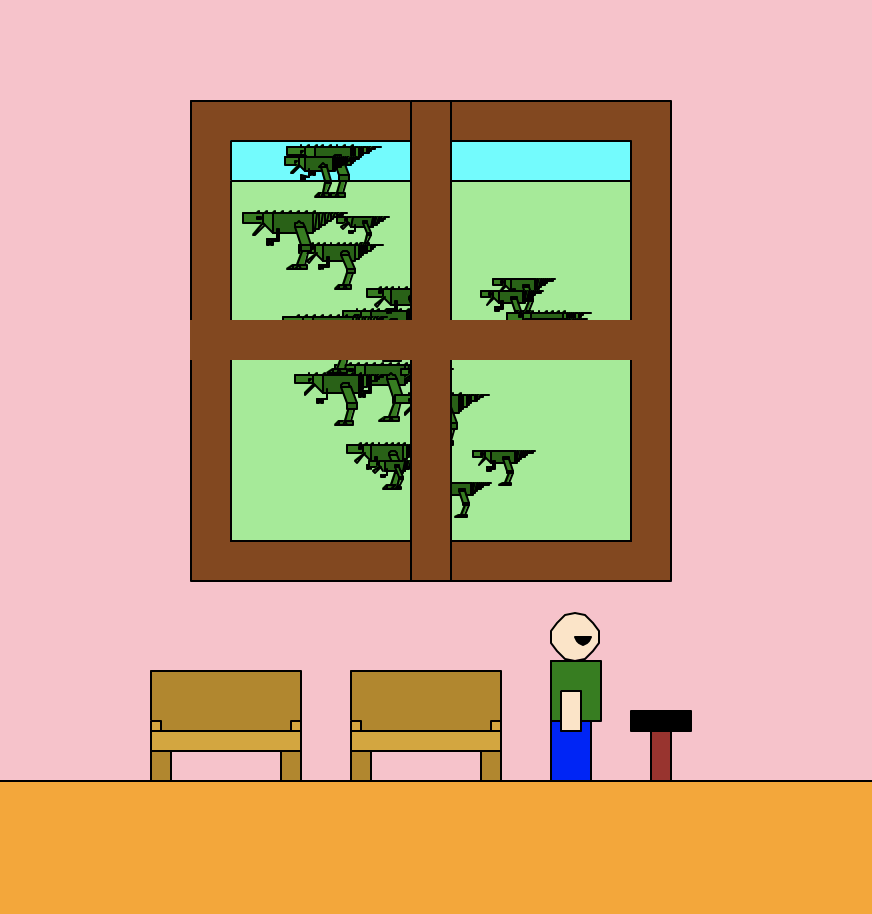
In this project, you will practice using functions to make scenes with more hierarchical complexity. So far, you have made scenes as collections of compound shapes, which are collections of simple shapes. Now you will take this one step further and create a scene within a scene that will incorporate miniature versions of your previous scenes in it, inspired by the Surrealist Art Movement.
The goals of this project are:
- Encapsulation: making each shape and scene function work as independent units that you can re-use at any time.
- Use conditionals randomness to add nuance to your scenes.
- Use keyword parameters to add extra structure.
- Use best practices for code organization.
Extension points are awarded for complex scenes, especially those that show me that you can integrate concepts from lecture into making your scenes and take things to the next level!
Tasks
- Project 3: Scenes within scenes
1. Create better_shapelib.py
Import turtle and random. Copy-and-paste in your goto and rectangle functions from lab.
2. Make a Mondrian "scene"
2a. Make a mondrian function
Copy-and-paste main from lab into better_shapelib.py. Rename it mondrian.
Add an keyword argument named numRectangles that has some default value. The function signature so far should be:
def mondrian(numRectangles=<int of your choice>):
  '''Fill me in'''
Test out your mondrian function to make sure that it works. This should be done by adding the following to the bottom of better_shapelib.py:
if __name__== '__main__':
  mondrian()
Notes:
- Modify this main code to call
exitonclickand probablyturtle.tracer(False)(remember: if you turn animations off, callturtle.update()beforeexitonclickto make sure the canvas shows all your shapes). - Every time that you develop a new shape and/or scene in this project, you should test them out in main code like this and running
better_shapelib.pyto make sure they work.
Do NOT wait until the end of the project to test your code! Test as you go! - For
mondrian(and all other files and functions), follow the code organization best practices (e.g. make docstrings, use inline comments, etc.). This will affect your grade!
2b. Add position and scale parameters to mondrian
Imagine that the Mondrian that is drawn by your mondrian function is "a compound shape". Add required position and scale parameters:
def mondrian(x, y, s, numRectangles=<int of your choice>):
  '''Fill me in'''
Make the position parameters adjust where on the canvas the Mondrian is drawn and the scale parameter adjust its size. Test out drawing your "Mondrian scene" a few times in different positions at different scales. You should get something that looks like this:
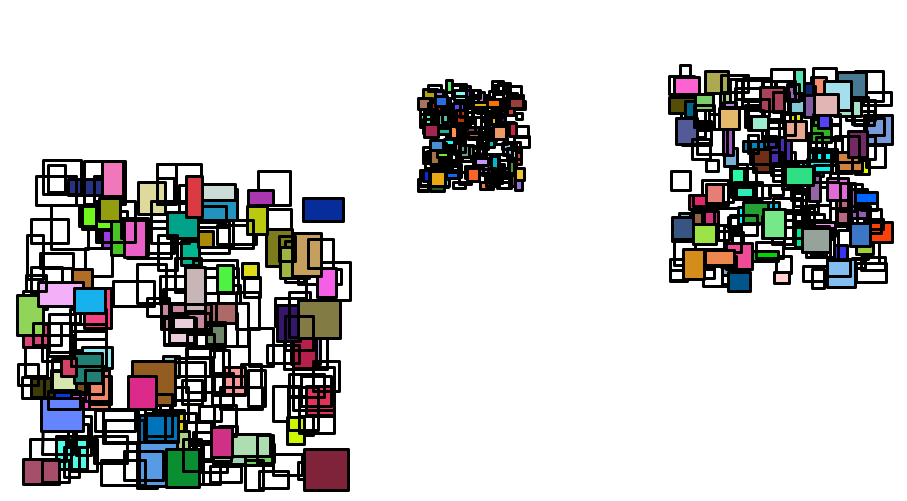
Take a screenshot. This is Required Image 1 to be included in your project report.
Hint: It might help to think of the random positions of the Mondrian rectangles as offsets from the (x, y) that you pass into the mondrian function.
3. Create Margritte "scene"
3a. Include at least 2 simple shapes from Project 2 in better_shapelib.py and update them
Think ahead: you will be creating a scene where an out of place object will be repeated all over last week's scene. You will want to pick shapes that are needed to draw your new object. Look at artwork from the Surrealist Art Movement to see examples of incongruent repetition like Golconda or Les valeurs personnelles by René Magritte.
Things to do for each simple shape function you paste into better_shapelib.py:
- Make sure that you use loops where ever possible. The goal is to make your code as efficient as possible in terms of the number of lines of code and the simplicity of that code. None of your functions should have lots of repetitive code!
- Add a
fillkeyword argument and integrate it into your function, include a default value. - Add a
colorkeyword argument and integrate it into your function, include a default value. - Remember: test each function one-by-one as you go.
3b. Create a new compound shape for better_shapelib.py
It should rely on the simple shapes from above.
- Make sure that you use loops where ever possible.
- Add
xandykeyword arguments and integrate them into your function to control the position the compound shape is placed. - Add a
skeyword argument and integrate it into your function to control the scale of the compound shape. - Add a
fillkeyword argument and integrate it into your function. - Add a
colorkeyword argument (maybe more if you need to control more than one color) and integrate it into your function.
3c. Create a magritte function to randomly draw your new compound shape everywhere
- Create a copy of your
mondrianfunction and rename itmagritte. - Replace the
rectanglefunction call with a call to your new compound shape. - Add at least one element of randomness when drawing your compound shapes (it doesn't need to be fancy). For example, only fill the shape 50% of the time, or pick between a couple of colors.
- Test out drawing your "Magritte" image a few times in different positions at different scales.
3d. Incorporate the new randomly placed objects into last week's scene
- Copy over your
colby1function from Project 2. - Copy only the dependent functions from
shapelib.pytobetter_shapelib.pythat haven't been copied over yet. - Modify the
colby1function to call the local functions, making any necessary updates to parameters. - Update the
colby1function to call themagrittefunction. Set the position and size parameters so that it only covers a portion of the scene. - Call only the
colby1function in the main function.
Run your code and take a screenshot. This is Required Image 2 to be included in your project report.
4. Create a Surrealist "scene"
4a. Update your scene from Project 2 in better_shapelib.py
def colby1(x, y, s):
  '''docstring'''
  # your code here
Make it so that your function uses the scale s and position (x, y) parameters like usual.
Reminders:
- Position one of your scene's shapes at
(x, y), convert the remaining hard-coded positions into offsets from(x, y). - Scale offsets and lengths/distances, NOT positions.
- Leave angles alone (e.g. don't change commands like
turtle.left(30)). - Commands that move the turtle count as lengths/distances
turtle.forward(100)turtle.forward(s*100)
4b. Update and test drawing last week's scene at multiple positions and scales
Call your colby1 function at least three times (in main code — i.e. indented in if __name__== '__main__':). Take a screenshot like you did for the Mondrian above. This is Required Image 3 to be included in your project report.
4c. Create a new surrealist scene that contains the Magritte scene.
In sureal.py, import your better shape library. You probably want to rename the import to save you typing:
import better_shapelib as bsl
Create a function called sureal in sureal.py that is a new scene which incorporates your colby1 scene at least once. Choose an artist or artwork from the Surrealist Art Movement for inspiration. For example, can you use this task to create a scene within a scene with disjointed or conflicting concepts?
In your report section called Art Reflection discuss which compositions/artists inspired you and what aspects of the compositions you emulated.
Running python3 surreal.py should draw your surealist scene. Take a screenshot. This is Required Image 4 to be included in your project report.
Check reproducibility
In order to grade your project, we need to be able to run your code and get the same results as you do! Here is a summary of the expected outputs from each of the source code files that you created:
python3 lab3.py: Draws your Mondrian from labpython3 better_shapelib.py: Draws your scene updated from Project 2 with a new compound object randomly placed multiple times at random sizes.python3 sureal.py: Draws your sureal scene.
Extensions
Congratulations on completing the core tasks! If your code and report meet the above expectations, you’ve already earned up to 26/30 points for this project.
The remaining 4/30 are a chance for you to earn credit for exploring parts of this project and digging deeper to express your creativity! This is entirely optional; 26/30 is a B and is a perfectly respectable place to stop. Extensions are open-ended and exist to compliment the structured core project. Explore and learn something new that interests you! Concentrating your energy on 1-2 "deep" extensions that challenge you will earn you more points than many small, "shallow" extensions.
You can pick your own topics that interest you. Here are a few examples:
- Creative or complex scenes above and beyond the basic expectations count as extensions
- Make a new scene and place it into the surreal scene.
- Demonstrate even more levels of hierarchical encapsulation (scenes within scenes within scenes).
- Learn about and use command line arguments control a number of different aspects of the scene. Be sure that you use
sys.argvinsurreal.pyand thesurealfunction.
Submission checklist
To turn in your project, make sure you do all of the following:
- Check the rubric in Google Classroom and make sure your report and code contain all the required parts.
- Move your lab folder inside your project folder (i.e. drag the
Lab03folder insideProject03). - Create a zip file of your project.
- Attach (drag) the zip file to the posted project assignment on Google Classroom.
- Click Turn In on your Google Doc report on Google Classroom.