CS 151 Fall 2021 Syllabus Labs/Projects
Lab 9: Inheritance
This week's lab focuses on class global variables and inheritance. Specifically, you will:
- make your
TurtleInterpreterclass compatible with inheritance. - make a
Squareclass that inherits from aShapeparent class.
- Lab 9: Inheritance
Tasks
L0. The setup
Create a Lab09 folder on your computer where you store CS151 projects and labs, hopefully somewhere that is backed up (e.g. in Dropbox, Google Drive, Microsoft OneDrive, etc.)
Copy over your lsystem.py, turtle_interpreter.py, and test_drawString.py from last project into this week's lab folder.
Open up a Terminal (e.g. Control+` in VS Code) and change the directory (cd) to the Lab09 folder.
L1. Update your TurtleInterpreter class
You will now make a few changes to TurtleInterpreter to accommodate the use of inheritance in this week's project.
These changes are:
- Making
TurtleandScreenobjects class global variables. - Adding L-systems symbols for turning turtle fill on and off.
The reason for the first change is if we were to make multiple TurtleInterpeter objects, we do not want to create multiple turtles and screens. By making the Turtle and Screen objects class global, they will be shared by every TurtleInterpreter object, which is what we are going to want.
L1a. Convert your Turtle and Screen object instance variables into class global variables
Place your your Turtle and Screen object above the constructor (but still inside the class — indented the same as the method def keywords). To make them class global variables, remove self. from the Turtle and Screen objects.
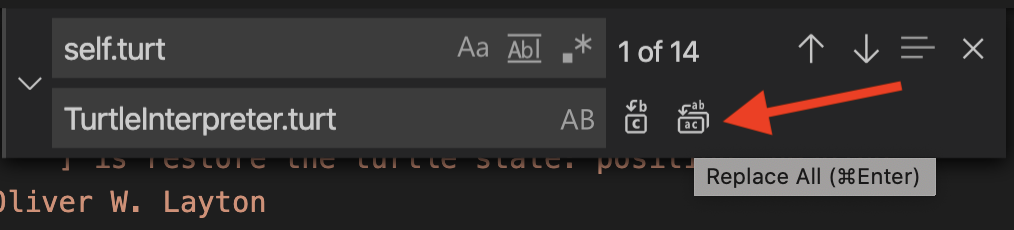
Because all references to your Turtle and Screen objects throughout your TurtleInterpreter class assume these objects are instance variables, you will need to replace them all with global class variable notation. For example, if you called your Turtle object self.turt, you would need to replace all occurrences of self.turt with TurtleInterpreter.turt.
This can be tedious if done manually. Therefore, I suggest learning to use VS Code's "Find and Replace All" feature. At the top of your computer screen, navigate to Edit -> Replace. You should see a new window with two blank text boxes: the top is what to find in your code file and the bottom is to what to replace it with. Fill it in like the following example (substituting whatever name you are using for your Turtle object). As indicated in the screenshot, click the Replace All button to find and replace all occurrences in the file.
Repeat this "find-and-replace-all" process for your Screen object.
L1b. Add symbols for starting and ending color fill to L-system alphabet
Expand the L-system alphabet in drawString to include:
{have the turtle start filling}have the turtle stop filling
Remember to use class global notation now.
Download and run test_checkerboard.py to test out color filling. You should see a colorful checkerboard with alternating squared filled in.
L2. Shape class
In this task, you will create a class called Shape. It will be the parent class of other shape classes. Each child class will use a L-system string to draw one non-fractal shape (e.g. squares, rectangles, pentagons, etc.). Each specific shape will be a child class of Shape (e.g. a square is a shape).
L2a. Create the Shape class
Create a new source code file called shapes.py.
Important: shapes.py should NOT import turtle, only TurtleInterpreter.
Write the constructor with the following docstring and method signature:
def __init__(self, distance=100, angle=90, color=(0, 0, 0), lsysString=''):
    '''Shape constructor

    Parameters:
    -----------
    distance: float. Distance in pixels to go when moving the turtle forward
    angle: float. Angle in degrees to turn when turning the turtle left/right
    color: tuple of 3 floats. Default turtle pen color
    lsysString: str. The L-system string of drawing commands to draw the shape
        (e.g. made up of 'F', '+', '-', ...)
    '''

    # Create instance variables for all the parameters

    # Create an instance variable for a new TurtleInterpreter object
Write the following one-liner set and get methods in the Shape class:
- Get the
TurtleInterpreterobject:def getTI(self): - Get shape's L-system string:
def getString(self): - Set the shape's color:
def setColor(self, c) - Set the shape's edge distance:
def setDistance(self, dist) - Set the shape's turning angle:
def setAngle(self, a): - Set the L-system string:
def setString(self, s):
Finally, create a method that is called to draw the shape:
def draw(self, x_pos, y_pos, scale=1.0, heading=0):
    '''Draws the L-system string at the position `(x, y)` = `(x_pos, y_pos)` with the turtle
    facing the heading `heading`. The turtle drawing distance is scaled by `scale`.
    '''
Your draw method should use only your TurtleInterpreter instance variable to:
- Move the turtle to
(x_pos, y_pos)and have headingheading. - Set the turtle color to the shape's color.
- Draw the L-system string that defines the current shape using the
TurtleInterpreterdrawStringmethod. When passing in thedistanceparameter, multiply it byscale.
Remember: it is forbidden to import the turtle module in shapes.py!
L2b. Create a child class called Square
In shapes.py, create a child class of Shape called Square (i.e. Square inherits from Shape). The class should consist of only the constructor, which has the following signature:
def __init__(self, distance=100, color=(0, 0, 0), fill=False):
  # Create a variable for the L-system string that would draw a square.

  # if the fill parameter is true, concatenate the { and } characters
  # to the beginning and end of the L-system string,
  # updating the value of the L-system string.

  # Call the parent's constructor, passing along values for all its
  # parameters.
L2c. Test the Square class
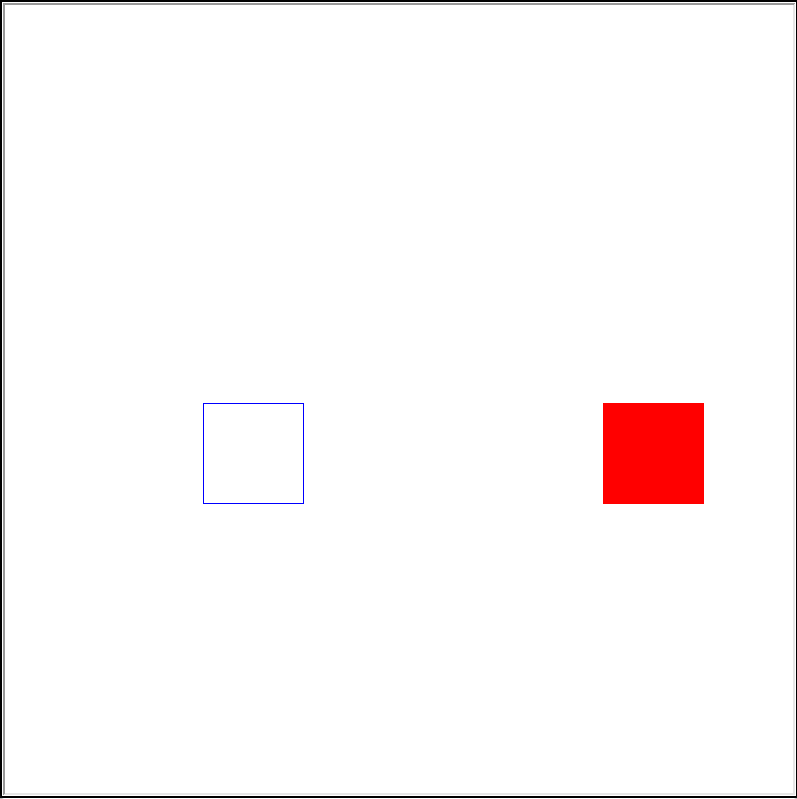
Download and run test_square.py to test your code. You should see a blue non-filled in square next to a red filled in square:
Get started with the project
Once you are done with each of the lab tasks, you may start on the project.