Heart Rate Monitor |
Goal
- Create a heart rate monitor using the IR Emitter and Detector circuit (from Lab 1).
- Implement Digital Signal Processing techniques.
|
Setup |
Setup
Start with your code from Lab 1 that reads from analog pin A0 and writes to the serial port at baud rate 9600.
Save it as a new Arduino project titled colbyUsername_P01 (with your colby username, mine would be hewolfe_P01).
MyFilter Library
You will need to write a MyFilter Library, with a MovingAverage and a ZeroCrossing struct.
I am providing a header file if you would like to use it: MyFilter.h
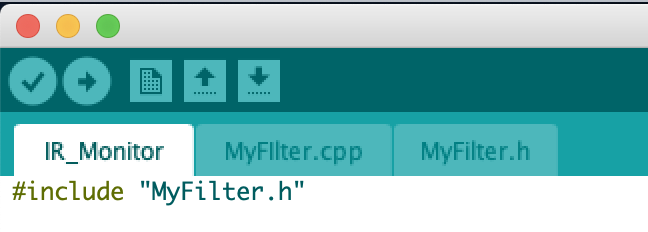
- Create a header file and cpp file, and save them in the same directory as your Arduino Sketch.
- Include the header file in both your .ino file and .cpp file.
|
Moving Average |
Moving Average
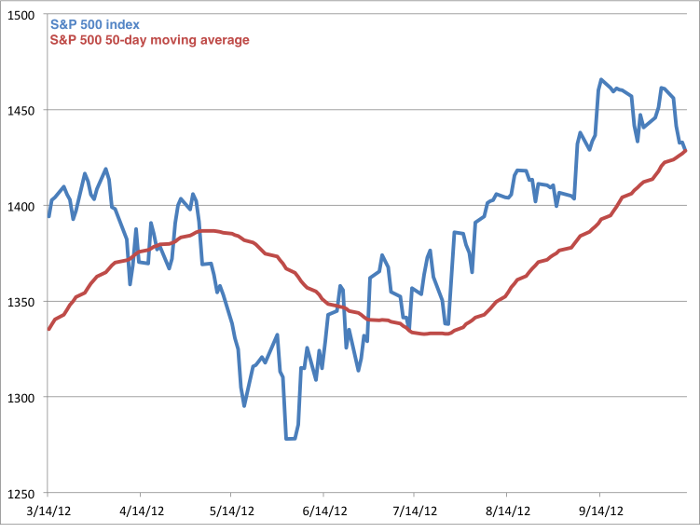
- To smooth a signal implement and use a simple moving average.
- A simple moving average returns the average of the last n elements.
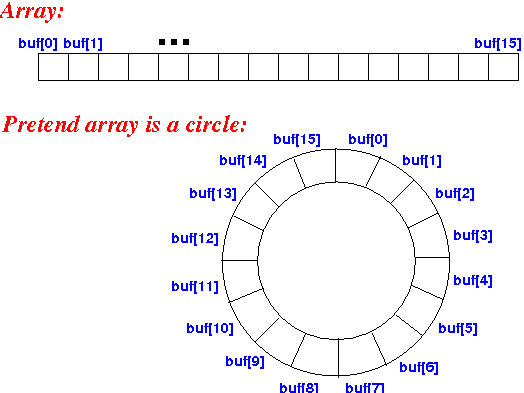
- One way to implement it is to use a circular array. Each time a new value is added it replaces the oldest value in the array.
- To keep track of the current sum of the array, subtract the old value being removed from the sum and add the new value that is being added.
- In the global scope of your program define the array and instance of the struct.
Other ways to implement a moving average are discussed in Chapter 15 Moving Average Filters of The Scientist and Engineer's Guide to Digital Signal Processing.
|
Zero Crossing |
Zero Crossing
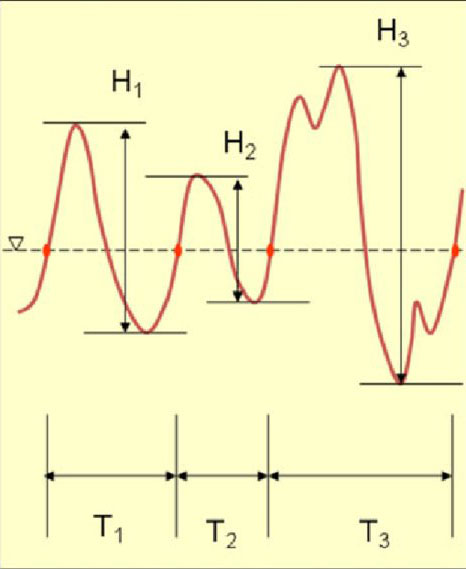
- A zero crossing is when a line intersects with 0.
- The zero crossing rate is the number of times a line intersects zero during a specific period of time divided by the length of that period of time.
- We are specifically trying to calculate how many heart beats per minute, so we just need how many times a line intersects zero during a minute, divided by 2.
- By tracking when the sign of the line changes we can calculate the zero crossing rate.
The Heart Rate can be defined as the following...

where W L is the window length and sgn[x in] is the sign function, i.e.
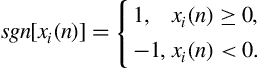
Suggestions:
- Create your own struct to keep track of the required information (like the last signal value).
- Calculate the heart rate for a shorter period of time x (like 15 seconds) and then multiply the result by 60/x.
|
Heart Rate |
Calculate the Heart Rate
General steps inside the loop:
- Read the signal from A0.
- Use a moving average to find the mean of the signal.
- Subtract the moving average from the signal to get the deviation from the mean.
- Use another moving average to smooth the deviation from the mean.
- Calculate the zero crossing rate to find the heart rate.
- Print the heart rate and the filtered signal to the Serial Port.
- This code should print an updated calculated heart rate as time passes.
|
Submission |
Submit your code on Filer
Submit your arduino code in a folder titled colbyUsername_P01 (with your colby username, mine would be hewolfe_P01).
Submit your report and video on Google Classroom
Upload a 1-3 min Documentation Video. Show that your sensor works and the serial plotter is plotting the heart rate and filtered signal.
Attach a Google Doc Report which includes:
- Photo of circuit. Clear photo of the circuit in which the wiring is clearly visible.
- Implementation Section
- What algorithms did you use? How did you implement them?
- Results & Reflection Section
- Try a range of constants for the moving averages' window size. How does it effect the signal?
- Do your results make sense?
- What constants did you decide to use for your final heart rate monitor? Why?
- Take your pulse by hand, and then take it using your heart rate monitor. How accurate is it?
- How well does your implementation work?
Acknowledgements Section
- What resources did you use. Include websites, books and anyone you received help from or discussed the project with.
|