Project 02 |
Goal
- Create a vibrotactile watch using the motor, button and potentiometer circuit (from Lab 2).
- Implement Signal Generation techniques.
|
Setup |
Setup
Start with your code from Lab 2 that controls a motor.
Save it as a new Arduino project titled colbyUsername_P02_Part1 (with your colby username, mine would be hewolfe_P02_Part1).
|
Signal Generation |
Square wave Generation
Wavetable Generation
Read about PWM (Pulse Width Modulation).
- Create a file
Waveforms.h and put it in the same folder as your arduino project.
- Add a header guard to the top of
Waveforms.h
- Create a constant by defining
maxSamplesNum as 120.
- Create a static integer array
waveformsTable with maxSamplesNum values and set it to the list of square wave values.
Using Wavetables
Read: 6.3.3.1 Table-Lookup Oscillators and Wavetable Synthesis
- In your .ino file include
Waveforms.h
- Globally define
oneHzSample as 1 million divided by maxSamplesNum
- Within the loop function, write a value from the
waveformsTable to the motor's pin. Then delay oneHzSample microseconds. Arduino Reference
- Use a global variable to track what index of the waveformsTable is being read and increase the index in each loop.
- Test your code with your board.
|
Vibrotactile Generator |
Generate more Waveforms
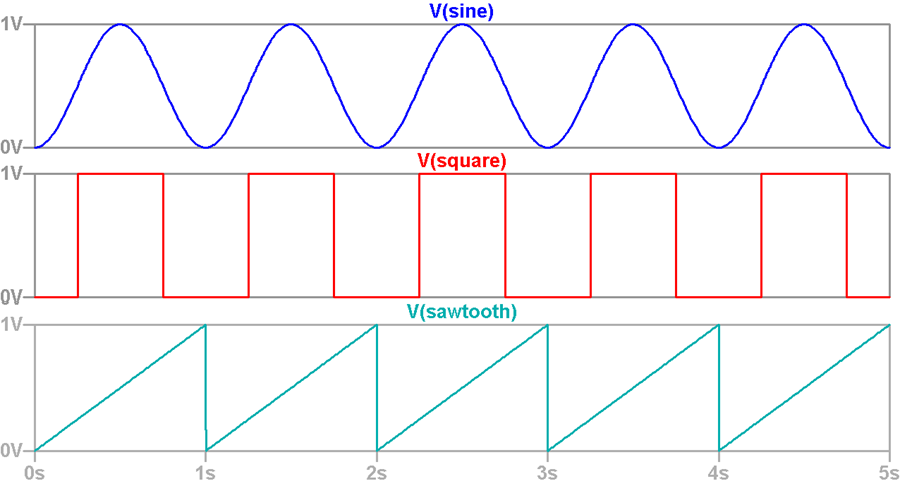
- In your .h file create a constant by defining
maxWaveform as 3.
- Modify
waveformsTable to be a maxWaveform X maxSamplesNum 2D array.
- Generate and add an array of 120 hex values to represent the Sawtooth wave from 0 to 255 shown above. Modify generator_example.cpp, using round.
- Generate and add an array of 120 hex values to represent the Sine wave shown above. Modify generator_example.cpp, using sine.
- Modify your code in your .ino file to change the waveform when the button is pressed, cycling through the three vibrotactile patterns.
Control the sample rate.
- Use the potentiometer to control the sample rate.
- You will have to map the potentiometer range (0-1023) to a value between 0 and
oneHzSample. Make sure to constrain the results between 0 and oneHzSample.
- At the end of the loop a delay. Delay your new value in microseconds.
VIDEO: Vibrotactile Generator
Create a 0.5-2 minute Documentation Video with narration.
- Show that you can change the speed of the pulses vibration with the potentiometer.
- Show that you can switch the type of signal by pressing the button.
- Say what you are doing while you are doing it like: "I am increading the speed of the vibration with the potentimeter", "This signal is a sine wave, after pressing the button now it is a sawtooth wave."
|
Vibrotactile Watch |
Vibrotactile Watch
Build a vibrotactile interface for a watch. When the button is pressed send a series of signals to the motor to represent the time.
- DO NOT OVERWRITE YOUR VIBROTACTILE GENERATOR CODE
- Start with your code from Vibrotactile Generator.
- Save it as a new Arduino project titled
colbyUsername_P02_Part2 (with your colby username, mine would be hewolfe_P02_Part2).
- The Arduino does not have universal time built in. Have global variable(s) that represent the time that you uploaded your sketch.
- Use millis() to determine how much time has elapsed since the program was started.
- Calculate the current time.
- Modify your code to print to the serial port what time it is when the button is pressed using an interrupt.
- Decide how you are going to represent time.
- Use atleast two types of waveforms
- Using your vibrotactile generator, design your time tactons
- How are you going to represent hours and minutes differently?
Ideas for how to represent time:
- Look at Brewster's Paper on Tactons for inspiration.
- Check out pages 19 and 20 from the smart watch patent in the datasheets folder Datasheets
- Option: Use binary code.
- Option: Use morse code.
|
Extension |
Minor Extensions
Minor extensions build on the pre-existing circuit for this project.
Here are some ideas:
- Design and implement more waveforms that are significantly different than sine, sawtooth and square waves.
- Design a couple of different ways to communicate time and have a friend or roommate test them out. Which worked the best, why?
- Design and implement a new/different application of tactons that represents some kind of data.
Document your minor extension:
- Submit your code on filer in a folder inside your project folder.
- A 1-3 minute video documenting your extension working. (If different from project)
- A description of the extension.
- A section on implementation.
- A section on results & reflection.
- Include any relevant charts or graphs.
Major Extension
Design and implement an idea for a project that incorporates both the IR sensor and vibrating motor.
Button, potentiometer, and red LED are optional.
Document your major extension:
- Submit your code on filer in a folder inside your project folder.
- A 1-3 minute video of the system working.
- A description of the extension.
- A circuit diagram.
- A photograph of the circuit board.
- A section on implementation.
- A section on results & reflection.
|
Submission |
Submit your code on Filer
Submit your arduino code in a folder titled colbyUsername_P02 (with your colby username, mine would be hewolfe_P02).
Submit your report and video on Google Classroom
Upload a 1-3 min Documentation Video of your vibrotactile clock. Show that your vibrotactile watch works at different times. Describe what is happening.
Upload a .5-2 min Documentation Video of your vibration generator. (See instructions under Vibrotactile Generator)
Attach a Google Doc Report which includes:
- Photo of circuit. Clear photo of the circuit in which the wiring is clearly visible.
- Implementation Section
- How did you design the vibrotactile feedback?
- Include diagrams about how you mapped time to vibration patterns.
- Results & Reflection Section
- How well does your implementation work?
- Could you actually use this to tell what time it is?
- How well does your implementation work?
- Acknowledgements Section
- What resources did you use? Include websites, books and anyone you received help from or discussed the project with.
|