Projects and Lab Assignments Overview
This page has instructions and procedures for completing and submitting projects, as well as the project schedule with links to detailed project instructions.
Projects are large programming and writing assignments that you will submit either weekly or every other week (depending on the project).
Lab Assignments are ungraded assignments that prepare you to start the project. In some labs you will do exercises that the projects build on directly, but in others, you will do other types of preparation. The work you do on the lab is not directly submitted (unless the project builds on it directly in which case it is considered part of your project submission). However your work will be evaluated by showing us that your code passes a provided checkpoint script before you leave the lab period. See for additional details about the lab period procedures.
- How to get help (office hours etc.)
- Project/Lab Schedule and Links to Instructions
- Project Due Dates
- Submitting Projects
- Late Submission Policy
- Policy on Collaboration and Academic Integrity
Office Hours and Contact Info
- Allen Harper (Wednesday Lab Instructor; Section B Lecture Instructor)
- Lab: Wednesday 1-3:50 in Davis 122
- Office hours in Davis 330:
- Mon: 11-11:50 AM; 1-2:30 PM; 4-5 PM
- Wed: 11-11:50 AM, 4:00-5:00 PM (If no Dept. Meeting scheduled)
- F 11-11:50 AM
- Email: aharper [at] colby.edu
- For regrade requests, please submit them through Gradescope instead of by email.
- Ike Lage (Thursday Lab Instructor)
- Lab: Thursday 1-3:50 in Olin 001
- Office hours in Davis 211:
- Mon: 2:20 - 3:20 pm
- Tues: 3:30 - 4:30 pm
- Wed: 1:00 - 2:00 pm
- Fri: 11:00 am - 12:00 pm
- Email: ilage [at] colby.edu
- I try to respond to emails within 1 business day (i.e. I probably won't reply on weekends or at night).
- For regrade requests, please submit them through Gradescope instead of by email.
- Naser Al-Madi (Section A Lecture Instructor)
- Office hours schedule on course Moodle page in Davis 215
- Email: nsalmadi [at] colby.edu
- Evening TA Hours
- Times and locations (between 4 and 10 pm most days of the week)
- TAs familiar with the course material (look for CS 231 in the expertise column) can help you with projects or other assignments for this class!
Project Schedule
Submit projects by 10 PM on the Due Date (Wednesdays unless otherwise specified) in the associated Gradescope assignment!
| Project Number | Lab Link | Project Link | Lab Due Date | Due Date | Project Rubric |
|---|---|---|---|---|---|
| 0 | Java Bootcamp | See this week's lab | -- | Sept. 17 | P0 Rubric |
| 1 | ArrayLists and shuffling | Monte-Carlo Simulation: Blackjack | -- | Sept. 24 | P1 Rubric |
| 2 | 2D Arrays | Conway's Game of Life | -- | Oct. 1 | P2 Rubric |
| 3 | Linked Lists | Agent-Based Simulations | -- | Oct. 8 | P3 Rubric |
| 4 | Queues | Modeling a Server Farm | -- | Oct. 22 | P4 Rubric |
| 5 | Stacks | Sudoku | -- | Oct. 29 | P5 Rubric |
| 6 | Word Frequency Analysis | Nov. 5 | Nov. 12 | P6 Rubric | |
| 7 | PriorityQueues and Heaps | Searching on a Grid | -- | Nov. 19 | P7 Rubric |
| 8 | Graphs | Voronoi game on graphs | -- | Dec. 5 | P8 Rubric |
Project Due Dates
Projects will be due on Wednesdays at 10PM unless we specify otherwise. The usual schedule will be that we start labs during the lab sections on Wednesday and Thursday, and then you have the following week to work on the project before submitting it. Please come to lab ready to work on the new project even if you haven't completed the last one yet. Some projects will take 2 weeks; in these cases, you will submit code from your week 1 lab so we can check on your progress. This will be required and graded. The usual late submission policy applies for this code.
Submitting Projects
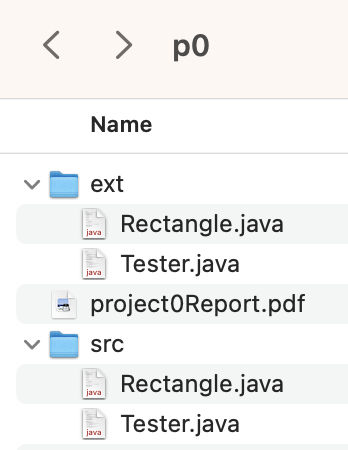
You will submit projects through Gradescope. As such, the file structure for your project is very important to get the autograder working! Your main project folder must be named "p<project number>" Note that the p is lowercase and there is no punctuation or spacing. For exxmaple, your project 2 folder will be named "p2" Inside that folder, you should have your lab report as a PDF and 2 subfolders: "src" and "ext" You can omit the ext folder if you haven't done any extensions. All of the code needed to compile and run your base project (i.e. everything up until the extensions) should be in your "src" folder. All of the code needed to compile and run your extensions should be in the "ext" folder. You will have some duplicated code and some code we supplied in your submission. That's not only ok, it's expected! Please also make sure not to change any of the file names and to pay attention to capitalization and punctuation. Once you have done this, please zip your "p<project number>" folder and make sure the zipfile is named "p<project number>" as well. You should upload this zipped file to Gradescope.
Here's an example of the expected project file structure on Mac for project 0.
You can submit your report using any formatting as long as it contains the expected sections and you submit it as a PDF file. If you would like a template to work from, you can make a copy of this template (go to file -> make a copy).
We're not being picky for the sake of being picky; the autograder only works if you follow these constraints. The autograder lets us devote more time to giving you qualitative feedback on your work so it's a pretty useful tool for us (graders) and for you! Being able to correclty organize files in a large software project is also a very important skill to develop. If you ever want help getting your submission in the right format, please ask us in lab, stop by our office hours, or send us an email!
Late Project Submission Policy
This class has a different policy for submitting late work than your other CS classes so please be sure to read it carefully!
You have a budget of 8 late days that you can use across any combination of projects throughout the semester. For each project, you can submit it up to a maximum of 2 days past the due date. That means that you can’t submit any project past Friday at 10 PM for full credit since they are due on Wednesday at 10 PM. However, you can still submit projects past this point for a maximal score of 65%. You will almost always be better off to submit a partially complete project anyway, as you could very well have more than 65% of it done. Even if you score less than 65%, you can improve the score up to a 65% at any time.
My advice is not to plan to use late days. If something unexpected comes up on top of that, you may find yourself out of late days. These late days are for the unexpected and by using them in other cases, you are choosing to not have them in the case that you need them. We will not give additional late days or deadline extensions without a note from your class dean.
You do not need to tell us if you are using late days. We will track them based on when you submit your projects, but you are responsible for remembering how many you have remaining.
This policy is designed to help you do well in this class! It gives you flexibility to take your time doing good work as unexpected things come up, but it also encourages you to stay on track in the class and not fall behind. It is better to submit a partially done project on time than to wait and fall behind on your other work! Check out our advice on Submitting a partially finished project to get tips on how to get the points you deserve for your work!
That being said, we know that sometimes exceptional circumstances come up. This late policy will not keep you from earning credit for this class. If your final grade is less than a C- under this late policy, we will grade late work for full credit until you earn a C- (this does not apply under any other circumstances and your maximum grade in this case is a C-).
Policy on Collaboration and Academic Integrity
Homework assignments and projects may be discussed between your current classmates under the condition that you write up your own answers separately. Feel free to reach out to me about clarification on this.
Your professor reserves the right to ask students to verbally explain the reasoning behind any answer or code that they submit and to modify grades based on the answers. It is vitally important that you turn in work that is your own! Reports of academic dishonesty are handled by an academic review board and a finding of academic dishonesty may result in significant sanctions. For more details on Colby’s Academic Integrity policies and procedures, see https://www.colby.edu/academicintegrity/.
Policy on Use of Generative AI
Labs have the same AI policy as your lecture section.
Understanding and using AI are important skills that you will master as part of your CS education at Colby, and the following policy will provide a controlled way for you to use AI to your learning advantage in this course:
- Students may use AI tools (e.g., ChatGPT) solely for understanding concepts, reviewing examples, or receiving feedback on their code. These tools can be valuable for clarifying ideas and enhancing comprehension.
- Using AI to generate any code, solutions, or answers is strictly prohibited and considered academic misconduct. All submitted work must be entirely the student’s own effort.
- Students must be able to demonstrate their understanding of solutions through verbal explanations, either in class discussions, office hours, or during assessments.
- When AI tools are used for understanding concepts, reviewing examples, or receiving feedback related to a specific assignment or project, students must:
- Clearly indicate the extent and nature of the AI’s contribution.
- Be prepared to discuss and explain the submitted work during office hours or in class
- The use of AI code completion tools, such as GitHub Copilot or other similar platforms, is completely prohibited. Students must write and develop their code independently to ensure they are practicing and reinforcing the skills taught in the course.
-
Here are some examples of prompts that do not violate the AI policy:
- “What is the difference between a stack and a queue?”
- “How does a binary search tree work?”
- “I'm encountering this error message 'IndexError: list index out of range' when running my code. What does it mean, and how can I fix it?”
- “Can you explain how Dijkstra's algorithm works? I'm trying to understand its steps and how it’s applied in practice.”
- “Can you help me debug my code? Don't generate any code, just help me understand why my code is not working.”
-
Here are some examples of prompts that violate the AI policy:
- “Can you provide me with a solution to this problem?”
- “Can you write a function that ...?”
- “Can you generate a code snippet that ....?”
- “Can you fix my code so that ...?”
Violations of this policy, including the use of AI for generating code or failure to properly document AI interactions, may result in penalties ranging from a warning to a failing grade for the assignment or course, in accordance with the institution's academic integrity policy.