Heart Rate Monitor |
Goal
- Create a heart rate monitor using the IR Emitter and Detector circuit (from Lab 1).
- Implement Digital Signal Processing techniques.
|
Setup |
Setup
Start with your code from Lab 1 that reads from analog pin A0 and writes to the serial port at baud rate 9600.
Save it as a new Arduino project titled colbyUsername_P01 (with your colby username, mine would be hewolfe_P01).
MyFilter Library
You will need to write a MyFilter Library, with a MovingAverage and a ZeroCrossing struct.
I am providing a header file if you would like to use it: MyFilter.h
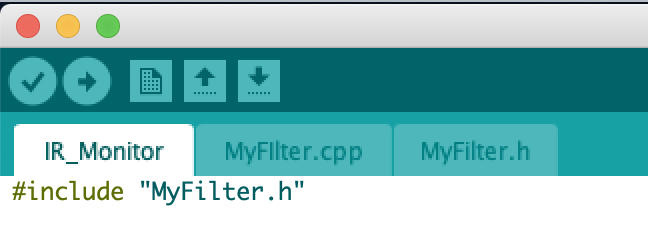
- Create a header file and cpp file, and save them in the same directory as your Arduino Sketch.
- Include the header file in both your .ino file and .cpp file.
|
Moving Average |
Moving Average
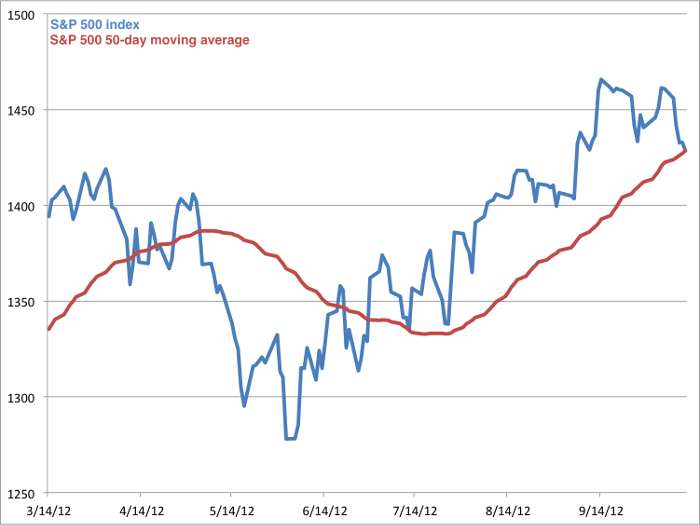
- To smooth a signal implement and use a simple moving average.
- A simple moving average returns the average of the last n elements.
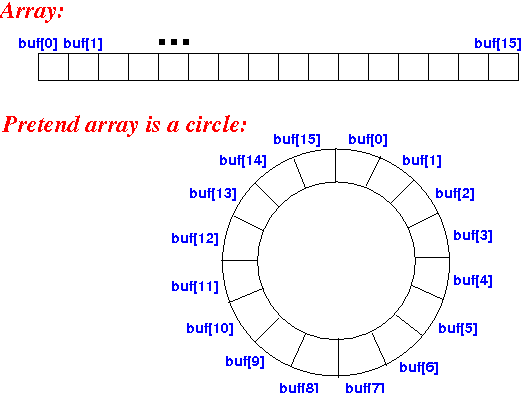
- One way to implement it is to use a circular array. Each time a new value is added it replaces the oldest value in the array.
- To keep track of the current sum of the array, subtract the old value being removed from the sum and add the new value that is being added.
- In the global scope of your program define the array and instance of the struct.
Other ways to implement a moving average are discussed in Chapter 15 Moving Average Filters of The Scientist and Engineer's Guide to Digital Signal Processing.
|
Zero Crossing |
Zero Crossing
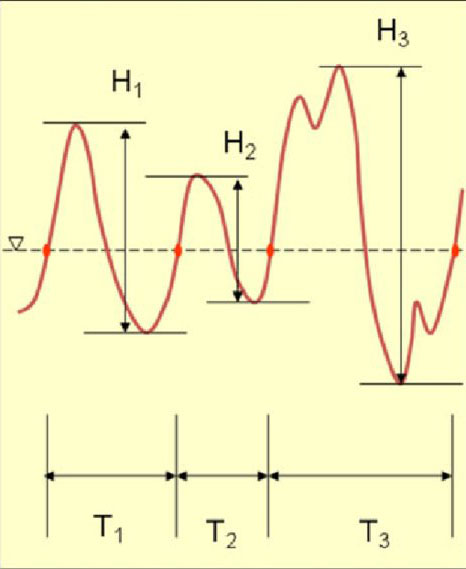
- A zero crossing is when a line intersects with 0.
- The zero crossing rate is the number of times a line intersects zero during a specific period of time divided by the length of that period of time.
- We are specifically trying to calculate how many heart beats per minute, so we just need how many times a line intersects zero during a minute, divided by 2.
- By tracking when the sign of the line changes we can calculate the zero crossing rate.
The Heart Rate can be defined as the following...

where W L is the window length and sgn[x in] is the sign function, i.e.
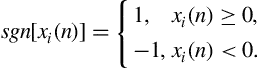
Suggestions:
- Create your own struct to keep track of the required information (like the last signal value).
- Calculate the heart rate for a shorter period of time x (like 15 seconds) and then multiply the result by 60/x.
|
Heart Rate |
Calculate the Heart Rate
General steps inside the loop:
- Read the signal from A0.
- Use a moving average to find the mean of the signal.
- Subtract the moving average from the signal to get the deviation from the mean.
- Use another moving average to smooth the deviation from the mean.
- Calculate the zero crossing rate to find the heart rate.
- Print the heart rate and the filtered signal to the Serial Port.
- This code should print an updated calculated heart rate as time passes.
|
Extension |
Extensions
Optionally you can complete 1-2 extensions. Extensions can build on the pre-existing circuit for this project or can be a new circuit. The complexity of the chosen extension, the implementation and the quality of the documentation effects the final grade. I encourage ideas not on the list. I reccommend discussing your extension idea with me (in person or over email) if you are unsure if it reasonable.
Extension code must be separate from the project.
Here are some ideas:
- Invisible Tripwire Alarm (using Red LED & two metro minis)
- Morse Code Communicator (using two metro minis)
- DIY Proximity Sensor
- More accurate Heart Rate Monitor. Implement a Multiple-pass moving average filter (easiest), a recursive moving average filter and/or a single pole recursive filter (hardest). The single pole recursive filter can be used to add a high pass and low pass filter to your signal (I recommend starting with 1Hz lowpass filter and 2.5Hz highpass filter).
Document your extension:
- Submit your code on filer in a folder inside your project folder.
- A 1-3 minute video documenting your extension working.
- A description of your video.
- A description of the extension.
- A section on the implementation (include a circuit diagram and a photograph of the circuit board(s), if different from project).
- A section on your results & reflection (include any relevant charts or graphs).
|
Submission |
Submit your code on Filer
Submit your arduino code in a folder titled [your username]_[your partner's username]_P01 (with your colby username and your partner's, mine would be hewolfe_P01) on filer in your Projects folder, /Courses/CS353J_A_JP/<your username>/Private/Projects.
Submit your report and video on Google Classroom
Upload a 1-3 min Documentation Video. Show that your sensor works and the serial plotter is plotting the heart rate and filtered signal.
Attach a Google Doc Report which includes:
- Photo of circuit. Clear photo of the circuit in which the wiring is clearly visible.
- Implementation Section
- What algorithms did you use? How did you implement them?
- Results & Reflection Section
- Include screen shots of the serial plotter to support your results.
- Try a range of constants for the moving averages' window size. How does it effect the signal?
- Do your results make sense?
- What constants did you decide to use for your final heart rate monitor? Why?
- Take your pulse by hand, and then take it using your heart rate monitor. How accurate is it?
- How well does your implementation work?
Acknowledgements Section
- What resources did you use? Include websites, books and anyone you received help from or discussed the project with.
|