CS 151 Spring 2024 Syllabus Labs/Projects
Lab 7b: Classes
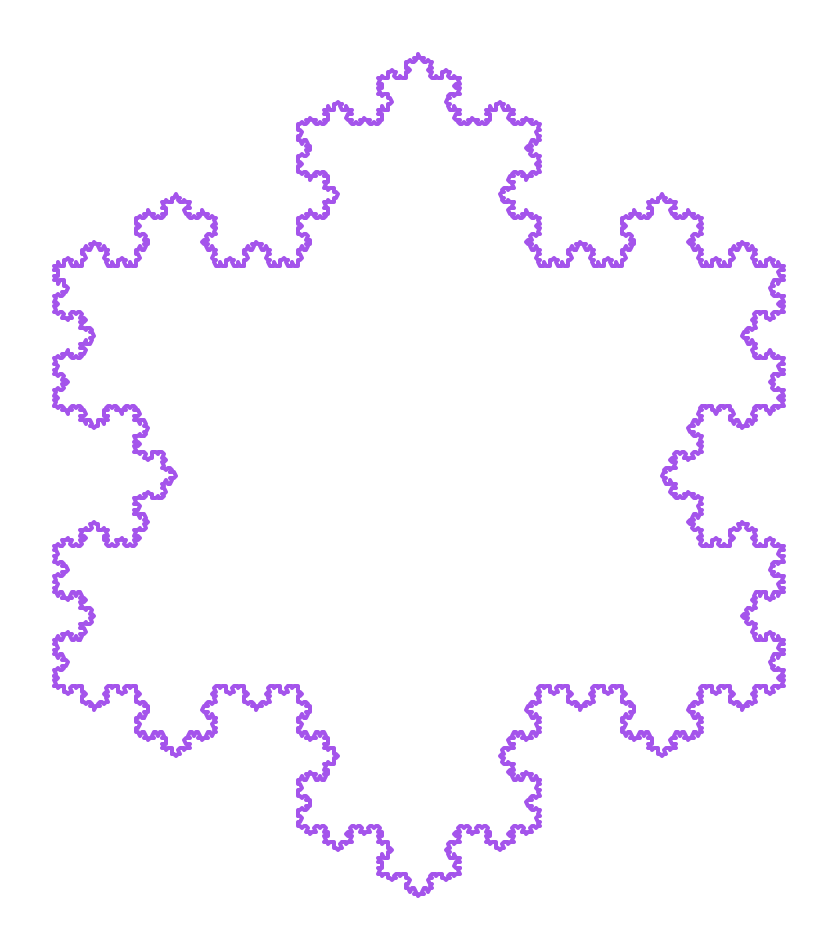
In this week's lab, you will practice designing your own classes for representing and drawing L-system strings. This will give you more practice manipulating strings, dictionaries, and file IO.
- Lab 7b: Classes
- Summary of L-systems
- Tasks
- L0. The setup
- L1. The L-system class
- L1a. Constructor and set/get methods
- L1b. Test set and get methods
- L1c. Method to read the L-system from a text file
- L1d. Test your read, set, and get methods
- L1e. Write your rule replacement method
- L1f. Write a method to apply the rule replacement method some number of iterations to the base string
- L1g. Test your L-system rule replacement code
- L2. The
TurtleInterpreterclass
- Get started with the project
Summary of L-systems
There is a division of labor between the two classes that you will create this week:
Lsystem: creates the L-system string that represents the shape that will be drawn (e.g.'F--F--F').TurtleInterpreter: takes the characters in the L-system string and interprets them as turtle movement and drawing commands. For example, when'F'is encountered, the turtle should move forward.
Important: The Lsystem class handles ONLY the string operations — it does do anything not directly related with the turtle. In others words, do NOT import turtle in lsystem.py!
An L-system consists of three components
All of these will be handled by your Lsystem class:
- An alphabet of characters (characters that correspond to drawing commands — e.g. 'F' means move forward by a distance)
- A base string
- One or more replacement rules
You will read in this information from a text file which looks like:
base F--F--F
rule F F+F--F+F
In this example, the base string is 'F--F--F' and there is one replacement rule: each F ("find string") is replaced with 'F+F--F+F' ("replace string"). Additional rules would appear on their own lines, in the same format as the rule on the second line above.
Here is the starting set of characters in the L-system alphabet that the TurtleInterpreter can draw and what they do:
Fis go forward by a certain distance+is turn left by an angle-is turn right by an angle
Tasks
L0. The setup
Create a Lab07b folder on your computer where you store CS151 projects and labs, hopefully somewhere that is backed up (e.g. in Dropbox, Google Drive, Microsoft One Drive, etc.)
Open VS Code. Create a new Python source code file called lsystem.py.
Open up a Terminal (e.g. Control+` in VS Code) and change the directory (cd) to the Lab07b folder.
L1. The L-system class
You will store the L-system (in the Lsystem class) in the following format:
- A base string
- Example:
'F-F-F-F'
- Example:
- A dictionary of replacement rules with the find string as the key and replace string as the value:
{rule 1 find string: rule 1 replace string, rule 2 find string: rule 2 replace string, ...}- Example:
{'F': 'FF-F+F-F-FF'}if there is only one replacement rule.
- Example:
L1a. Constructor and set/get methods
Create the Lsystem class and inside write the class constructor with the signature, following the "todo" items in the comments:
def __init__(self, filename=None):
    '''L-system class constructor

    Parameters:
    -----------
    filename: str. Filename of the L-system text file with the base string and 1+ replacement rules
    '''
  # Create an instance variable for the base string
  # (initialize as the empty string)

  # Create an instance variable for your replacement rules
  # (initialize as an empty dictionary)

  # Check if filename passed in (i.e. parameter is not None)
  # If so, read in the L-system from the file called
  # filename. Do this by calling the read method:
  # self.read(filename)
  # (you will implement this shortly)
Implement the following set, get, and other "one liner" methods:
- Method to get the base string instance variable:
def getBase(self): - Method to set the base string instance variable:
def setBase(self, newBase): - Method to get the value for the key
key:def getRule(self, key): - Method to add a new replacement rule
newRuleKeyandnewRuleValueto the current dictionary of replacement rulesself.rules:def addRule(self, newRuleKey, newRuleValue): - Method that returns a list of the replacement rules keys currently in the L-system:
def getKeys(self):
L1b. Test set and get methods
Download the test file test_set_get.py to your lab folder and run it to check your work. Make sure that all the test code works as expected before moving on.
L1c. Method to read the L-system from a text file
Write a method to read in the L-system from a text file that has the format described above. For example:
base F--F--F
rule F F+F--F+F
Here is the signature and see the code comments below to guide you through the method:
def read(self, filename):
    '''Reads the L-system base string and 1+ rules from a text file. Stores the data in the
    instance variables in the constructor in the format:

    base string: str.
        e.g. `'F-F-F-F'`
    replacement rules: dictionary.
        e.g. `{'F': 'FF-F+F-F-FF'}` for one rule

    Parameters:
    -----------
    filename: str. Filename of the L-system text file with the base string and 1+ replacement
        rules
    '''
    # Open the file called filename

    # Read in the file line-by-line.
    # For each line, split it into a 2 item list.
    #   If the first list item is the string 'base', set the L-system base string
    #   to the second item in the list.
    #   If the first list item is the string 'rule', add a rule to your replacement
    #   rules dictionary consisting of the find and replace strings
    #   (2nd and 3rd items in the list).
    #   Remember: We add a rule as a dictionary key-value pair: {find str: replace str}

    # Close the file
Remember, the L-system files have a standard format described above.
Guidelines:
- You can work with your instance variables directly, but I would suggest using the set/get methods you just wrote!
- You can call methods from within a class like functions, but prefixing the function call with
self.(e.g.self.getBase()instead ofgetBase()). Pay attention to what kind of data they expect as parameters and what they return (e.g. a list, a string). - Keep in mind that L-system files will only have one base string, but one or more rules.
- If you have new line characters (
\n) in your base and/or rule strings, the easiest way to remove them is to split the line by calling the split string method without any parameters (e.g.line.split()). Without a parameter,splitsplits by whitespace and automatically removes extra whitespace at the beginning and end (including new line characters!). Another approach is to use the strip string method. Note that strip is a string method and can only be called on a string, NOT a list.
L1d. Test your read, set, and get methods
Download
- the test file test_read.py
- A one rule L-system file systemKoch.txt
- A two rule L-system file systemC.txt
Run the test file with the two L-system file present in your lab working folder. Make sure that all the test code passes before moving on.
L1e. Write your rule replacement method
Here is the docstring with a summary of the instructions and method signature:
def replace(self, currString):
    '''Applies the full set of replacement rules to current 'base' L-system string `currString`.

    Overall strategy:
    - Scan the L-system string left to right, char by char
    - Apply AT MOST ONE replacement rule to a matching character.
        Example: If the current char is 'F' and that matches a rule's find string 'F', apply
        that rule then move onto the next character in the L-system string (don't try to match
        more rules to the current char).
    - If no rule matches a rule find string, we just add the char as-is to the new string.

    Parameters:
    -----------
    currString: str. The current L-system base string.

    Returns:
    -----------
    newString: str. The base string `currString` with replacement rules applied to it.
    '''
L1f. Write a method to apply the rule replacement method some number of iterations to the base string
Here is the method signature and docstring:
def buildString(self, n):
    '''Starting with the base string, apply the L-system replacement rules for `n` iterations.

    You should NOT change your base string instance variable here!

    Parameters:
    -----------
    n: int. Number of times you go through the L-system string to apply the replacement rules.

    Returns:
    -----------
    str. The L-system string after apply the replacement rules `n` times.
    '''
L1g. Test your L-system rule replacement code
Download the test file test_buildString.py It assumes that systemKoch.txt is in your lab folder. Make sure that all the test code passes before moving on.
Tip: If the length of the 3 iteration L-system is 449, you may have a new line character in your base string. To correct this, revise your read method.
L2. The TurtleInterpreter class
As mentioned above, the purpose of the TurtleInterpreter class is to translate a L-system string into turtle movement and drawing commands.
L2a. Write the constructor
Create a new file called turtle_interpreter.py and define a class in it called TurtleInterpreter. Inside, define the constructor with the following signature and docstring. You may want to turn off all turtle animations in the constructor (remember that tracer is a Screen object method).
def __init__(self, width=800, height=800, bgColor='white'):
    '''TurtleInterpreter constructor.
    Creates instance variables for a Turtle object and a Screen object with a particular window
    `width`, `height`, and background color `bgColor`.
    '''
    # Create a Turtle object, set it as an instance variable

    # Create a Screen object, set it as an instance variable.
    # Set the screen's height, width, and color based on the parameters

    # Turn the screen's tracer off.
L2b. Write set and get methods
Write the following methods for TurtleInterpreter that modify your Turtle object instance variable:
- Set the turtle's pen color to the color
c:def setColor(self, c) - Set the turtle's pen width to the int
w:def setWidth(self, w) - A goto function that places the turtle at (
x, y) and sets the heading toheadingif the value of theheadingparameter passed in is notNone:def goto(self, x, y, heading=None) - Get the screen's window width:
def getScreenWidth(self) - Get the screen's window height:
def getScreenHeight(self) - Copy-and-paste the following
holdmethod that you can call onTurtleInterpreterthat keeps the window open until the user clicks (like usual) or presses the 'q' key. Note: it assumes yourScreenobject instance variable is calledscreenand the one forTurtleobject is calledturt— modify these to accommodate your own naming scheme.
def hold(self):
    '''Holds the screen open until user clicks or presses 'q' key'''

    # Hide the turtle cursor and update the screen
    self.turt.hideturtle()
    self.screen.update()

    # Close the window when users presses the 'q' key
    self.screen.onkey(self.screen.bye, 'q')

    # Listen for the q button press event
    self.screen.listen()

    # Have the turtle listen for a click
    self.screen.exitonclick()
L2c. Write the drawString method
This is the method that translates an L-system string (e.g. 'F-F-F-F') into turtle drawing commands. It should process the L-system string one character at a time from left-to-right.
At the moment, you should add support for the following drawing commands:
Fis forward by a certain distance+is left by an angle-is right by an angle
Here is the method signature and docstring:
def drawString(self, lsysString, distance, angle):
    '''Interpret each character in an L-system string as a turtle command.

    Here is the starting L-system alphabet:
        F is forward by a certain distance
        + is left by an angle
        - is right by an angle

    Parameters:
    -----------
    lsysString: str. The L-system string with characters that will be interpreted as drawing
        commands.
    distance: distance to travel with F command.
    angle: turning angle (in deg) for each right/left command.
    '''

    # Walk through the lsysString character-by-character and
    # have the turtle object (instance variable) carry out the
    # appropriate commands

    # Call the update method on the screen object to make sure
    # everything drawn shows up at the very end of the method
    # (remember: you turned off animations in the constructor)
L2d. Test your TurtleInterpreter
Download and run the test code file test_triangle.py. You should get the following:
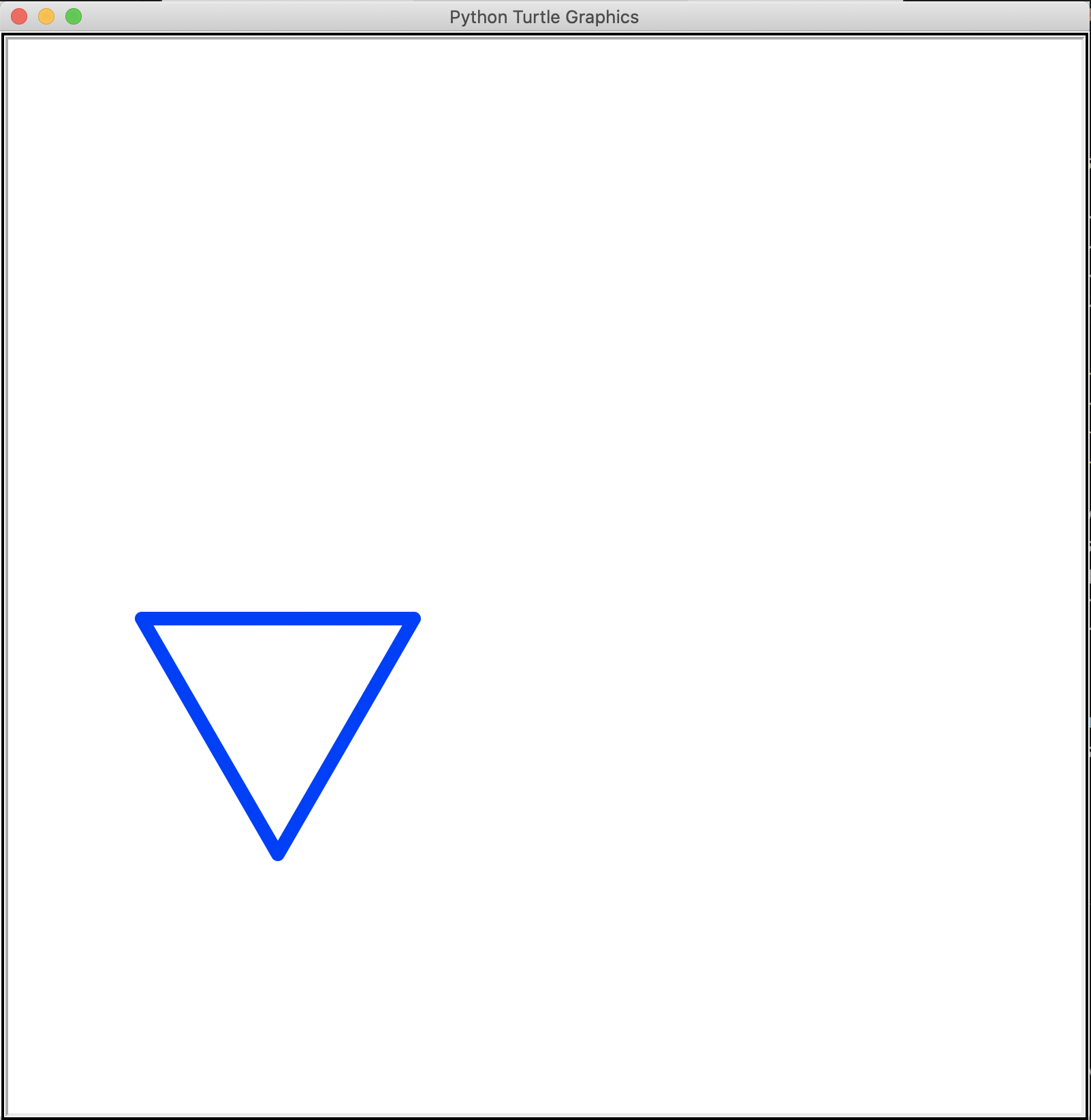
Above, take note of the position, thickness, and orientation of the triangle in the screen. Also note the test code print out showing the screen width and height.
Download and run the test code file test_drawString.py. You can test any L-system file that you'd like with it. Here is the usage statement:
Usage: python3 test_drawString.py <L-system filename> <distance> <angle>
Here are some test cases that you should try along with the expected results:
| L-system | distance (pixels) | angle (deg) | Output |
|---|---|---|---|
| systemKoch.txt | 40 | 60 |
|
| systemA1.txt | 40 | 90 |
|
| systemA2.txt | 40 | 90 |
|
| systemB.txt | 10 | 40 |
|


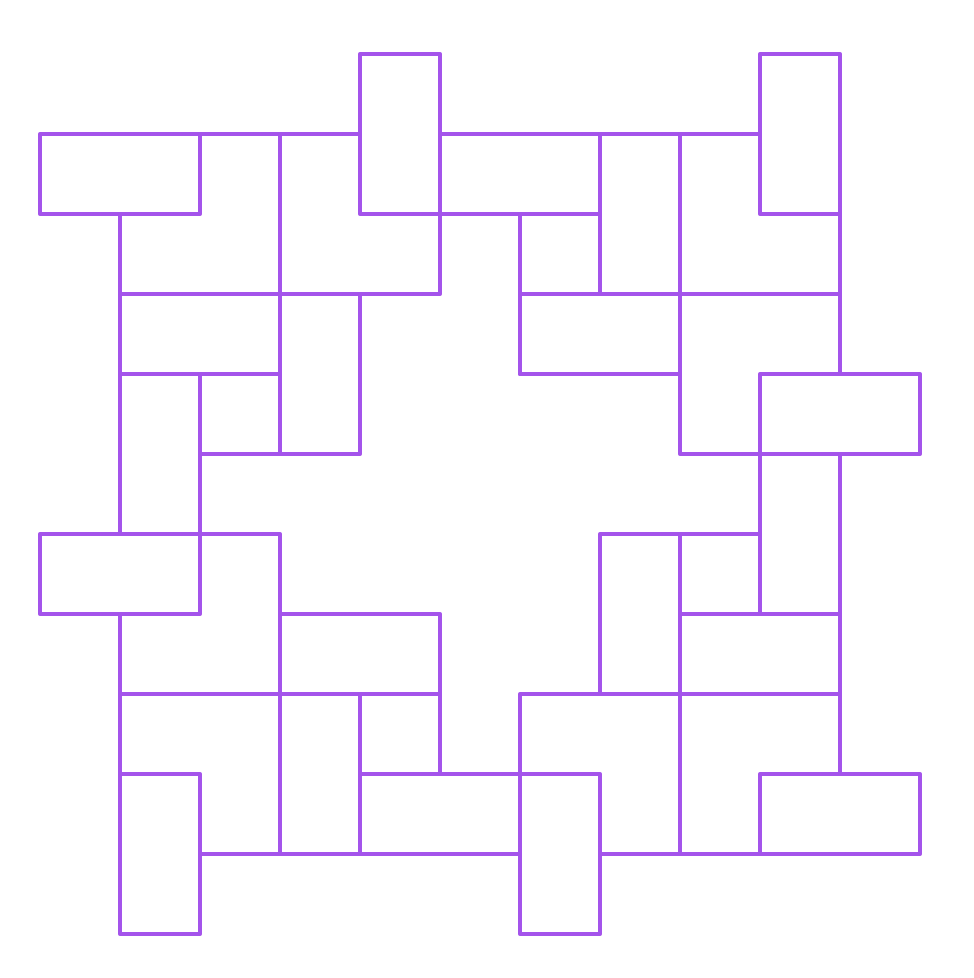
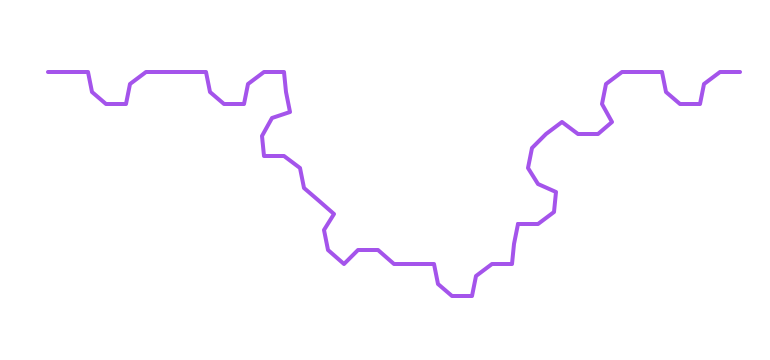
You are encouraged to play around with the angles to see how that affects the shapes that are drawn!
Get started with the project
Once you are done with each of the lab tasks, you may start on the project.